
Applies to
Platform: Fabric Lakehouse
Architecture: Stage
Fabric Lakehouse Stage JDBC generates a Stage layer that reads other databases over JDBC for Microsoft Fabric, as notebooks on Delta tables. Select the Generator Configuration Fabric Lakehouse Stage Jdbc when you add a project whose sources are MariaDB, Microsoft SQL Server, MySQL, Oracle or PostgreSQL databases. With the project property Target Platform set to Azure Synapse, it generates for Azure Synapse Analytics instead.
Another project, for example a Data Vault project, uses its Stage model objects as a linked project. For lakehouse tables use Fabric Lakehouse Stage.
Scope and output
- Platform: with Target Platform
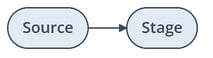
Fabric, the default, each layer is a schema of a Microsoft Fabric lakehouse. WithAzure Synapse, each layer is a database in Azure Synapse Analytics, which the deployment creates withCREATE DATABASE IF NOT EXISTS ... LOCATION. - Layers: Source and Stage. Dataflow Modeling shows Stage in the Bronze column. See Understand the Layering concept.
- Output: notebooks in the folders
Jupyter,HelpersandLoadControl, the notebook<project>_deployand, with Target PlatformFabric,deploy.ps1; described in Fabric Lakehouse - Artifacts.
Each arrow in the diagram is a dataflow between two layers:
Prerequisites
- Target Platform
Fabric: a Fabric workspace with a lakehouse with schemas, a service principal as Member of the workspace, and PowerShell 7 fordeploy.ps1. - Target Platform
Azure Synapse: an Azure Synapse workspace and a storage location per layer. - A network path from Fabric or Azure Synapse to the source database, and a database user that can read the source tables.
The setup is described in Fabric Lakehouse - Target environment and Azure Synapse - Target environment, the placeholders in Fabric Lakehouse - Placeholder values.
Sources and linked projects
The source system has the type MariaDB, Microsoft SQL Server, MySQL, Oracle or PostgreSQL. Its placeholders jdbc_url, jdbc_driver, jdbc_user, jdbc_password and schema_name hold the connection and the source schema. Source systems per generator configuration lists the discovery types.
You can export this project as a linked project. The configuration cannot import linked projects.
Supported model objects
Capabilities and limitations
- Generated objects per Stage: the table
stg_st_<model object name>, the view_resultand a loader notebook. There is no source view; the loader reads the source table into a temporary view. - Load: the loader replaces the rows of the table with
INSERT OVERWRITE. - Loaders: one notebook per loader in the folder
Jupyter, for exampleSTG_ST_CUSTOMER_Loader, with the load timestamp as the parameterbg_loadtimestamp. - Tables: Delta tables. File Format offers only
delta, and Optimization Method offersPartitioned ByandCluster By. - Keys: Stage tables have no hash columns and no key constraints. Indexes: index management is not available.
- Deployment: with the default Deployment Options, each deployment replaces the tables and the load control log tables with empty ones, see Redeploy and keep data. With Target Platform
Fabric, it also creates a schema per layer.
Project properties
The configuration offers no Hash Algorithm and no End of Universe. It offers these project properties, with their defaults:
- Begin of Universe:
1900-01-01 - Create Result Views: on
- Target Object Comment Type:
None; alsoTablesandTables and Views - Target Platform:
Fabric; alsoAzure Synapse - Deployment Options:
Generate Drop Table StatementsandGenerate Create Schema If Not Exists Statements - Notebook Deployment Objects Limit:
100 - Configure LoadControl: on
- Deploy LoadControl: on
- LoadControl Options:
Multi-Threading Notebook; alsoAirflow - Logging Method:
Delta Table; alsoPython Logger
Data types
Default Term data types by platform lists the data types of the Default Terms on Fabric Lakehouse.
Platform differences
The configuration differs from Microsoft SQL Server Stage of the same release in these points:
- Deployment Options default: drop tables, create schemas (Microsoft SQL Server: drop tables).
- Index management: not available (Microsoft SQL Server: available).
Both platforms offer the LoadControl Option Airflow. The native load control is Multi-Threading Notebook on Fabric Lakehouse.
Example
A Stage CUSTOMER reads the table CUSTOMER of a Microsoft SQL Server source system. Its loader STG_ST_CUSTOMER_Loader starts with these statements, shown with line breaks:
from trident_token_library_wrapper import PyTridentTokenLibrary
access_token = mssparkutils.credentials.getToken("keyvault")
df = spark.read.jdbc(
    '<jdbc_url>',
    '<schema_name>.CUSTOMER',
    properties={'user': <jdbc_user>,
                'password': <jdbc_password>,
                'driver': '<jdbc_driver>'})
The names in angle brackets are the placeholders of the source system. <jdbc_user> and <jdbc_password> have no quotes in the notebook, so their values are Python expressions: a literal in single quotes, or with Target Platform Fabric a secret from Azure Key Vault read with PyTridentTokenLibrary.get_secret_with_token and access_token; see Fabric Lakehouse - Placeholder values. The loader then writes the rows into stg_st_customer with INSERT OVERWRITE and sets bg_loadtimestamp to its parameter.
Release differences
Project Settings shows the Generator Version of your project.
- Generator 2.0: Target Object Comment Type replaced the value
Target PlatformwithTablesandTables and Views, defaultNone. - Generator 2.2: added the project properties Persist Validity and Create Result Views, and the model object property Increment Management Type on Stage. Deployment Options added
Generate Create Schema If Not Exists Statements, selected by default, and LoadControl Options addedAirflow.
Related articles
- Previous:
- Fabric Lakehouse: Target environment
- Azure Synapse: Target environment
- Next: Generate artifacts, Replace the placeholders in the artifacts
- Fabric Lakehouse: Artifacts, Deployment, Load data - Native load control, Load data - Apache Airflow load control
- Azure Synapse: Deployment, Load data - Native load control
- Reference: Target Platform (Project), Deployment Options (Project), Notebook Deployment Objects Limit (Project), LoadControl Options (Project), Optimization Method (Model Object)
- Fabric Lakehouse: Placeholder values
- See also: Available Generator Configurations, Understand the Generator Configuration, Source systems per generator configuration, Microsoft SQL Server Stage
- Fabric Lakehouse: Stage, Stage Files, Data Store, Data Vault, Dimensional