
Applies to
Platform: Fabric Lakehouse
Prepare Azure resources for a Fabric Lakehouse project that targets Azure Synapse: two storage accounts, a Synapse workspace and an Apache Spark pool. Afterwards you can deploy and load the generated artifacts in Azure Synapse. The setup applies to all Fabric Lakehouse generator configurations with the project property Target Platform set to Azure Synapse.
This article shows one possible setup. Azure Synapse offers many other configurations, which its documentation describes. For Target Platform Fabric, see Fabric Lakehouse - Target environment.
Prerequisites
- An Azure subscription in which you can create resource groups, storage accounts and Synapse workspaces.
- Azure Storage Explorer to create folders and upload files.
Set up the environment
- Create a resource group, for example
bg-synapse. - In it, create two storage accounts: one for the target data, for example
bgsynapsedatalake1, and one for source files, for examplebgsynapselandingzone1. - Create a Synapse workspace, for example
bgsynapseworkspace1. - Create an Apache Spark pool in the workspace. This article calls it
<Spark pool>. - In Azure Storage Explorer, open the target storage account and create a container for the target data, for example
docu-datalake.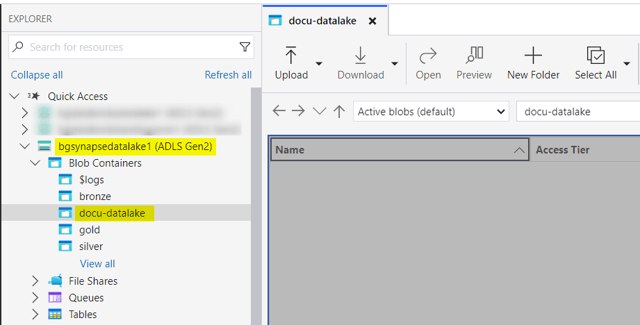
The deployment creates one database per layer and one for the load control. Each database has its folder at the path that you enter as database_directory in the placeholder values.
Provide source data
A project that targets Azure Synapse gets its source data from a Stage project, imported as a linked project:
- Files: a Fabric Lakehouse - Stage Files project loads Parquet, Delta or CSV files.
- Database tables: a Fabric Lakehouse - Stage JDBC project loads tables over JDBC.
Files
In Azure Storage Explorer, open the source storage account and create a container and folder for the files. Create one folder per source and upload its file into it. The Stage loader reads <file_path><source name>, so each folder carries the name of its source model object:


Database
The Stage JDBC notebooks must reach the source database from Azure Synapse. For an Azure SQL Database, select Allow Azure services and resources to access this server in the networking settings of the server:

Check the result
The resource group contains the two storage accounts, the Synapse workspace and the Apache Spark pool. The target storage account has the container for the target data.
Upload artifacts in Azure Synapse
Uploading the generated notebooks to the Synapse workspace and running them is described in Azure Synapse - Deployment.
Failure symptoms and recovery
Failures of the deployment are described in Azure Synapse - Deployment. Load failures are described in Azure Synapse - Load data - Native Load Control.
Related articles
- Next: Generate artifacts, Replace the placeholders in the artifacts, Azure Synapse - Deployment
- Reference: Fabric Lakehouse - Placeholder values, Target Platform (Project)
- See also: Fabric Lakehouse - Stage Files, Fabric Lakehouse - Stage JDBC, Manage Linked Projects, Fabric Lakehouse - Target environment