
Applies to
Platform: Microsoft SQL Server
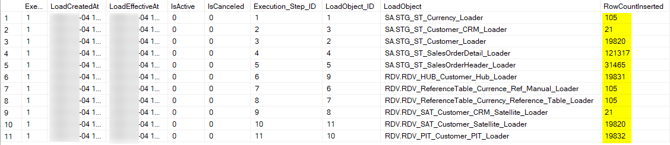
Load the deployed Microsoft SQL Server solution with the native load control by running execute.ps1. The script builds the execution plan of the project, runs every loader in dependency order and logs each step. Afterwards the procedure Show_Execution lists every loader with its result and row counts.
How the load control plans, runs and logs loads is explained in Understand Load Control.
Prerequisites
- LoadControl Options contains
Native Load Control, and Configure LoadControl istrue. - The artifacts are deployed without errors, including the load control.
- PowerShell 7 and sqlcmd are installed.
Load the data
- Open PowerShell 7 in the artifacts folder, the folder that contains
execute.ps1. - Run
.\execute.ps1.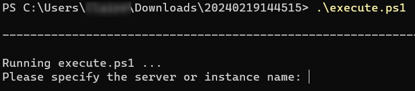
- Enter the server, the login and the password as for
deploy.ps1. Leave the server empty forlocalhostand the login empty for Windows authentication. The script returns when the execution has ended.

- Read the last message, as described in Check the result.
The script runs LoadControl\LoadControl_Execution_<project>.sql, where <project> is the project name. It builds the execution plan DEV_<project>, adds all load objects of the load configuration <project> and starts the execution. All loaders of one execution get the same load timestamp, the time at which the execution was created.
Check the result
The load succeeded when the last message reads Execution plan [DEV_<project>] completed by execution [<number>]. Otherwise it ends with with <number> FAILED or DISABLED load steps.

To see every step, run in the load control database, where LC is the load control schema:
EXEC [LC].[Show_Execution] @ExecutionPlan = N'DEV_<project>';
Each step shows its LoadObject, ExecutionResult, RowCountInserted and ErrorDescription. More queries are in Monitor Load Control.
Example
The Data Vault project Datavault.Mssql has 103 load objects. Its first load on a local SQL Server ran all 103 steps successfully and ended with:
Process_Execution_Step [87]: Execution [1] step [102] finished
  sucessful: INS 130, UPD 0, DEL 0, WRN 0, ERR 0, MSG (null)
...
Prepare_Execution_Step [87]: Execution [1] has no more selectable steps.
Process_Execution [87]: Execution [1] finished.
Start_Execution [87]: Execution plan [DEV_Datavault.Mssql] completed
  by execution [1].
The number in square brackets after the procedure name is the session ID; long lines are wrapped here.
Run loaders in parallel
To load with several workers, start execute.ps1 or the execution script in more sessions while the first execution runs. Each further session logs Execution plan [DEV_<project>] has active execution [<number>]. Adding worker. and runs steps of the same execution. A session that starts after the execution has ended starts a new execution, which loads all objects again.
In Show_Execution, ExecutionProcessSPID shows the session that ran each step:

LoadControl_Execution_<project>.sql also contains commented calls for other plans: a plan with the Stage layer only, removing load objects from a plan, removing a plan, and stopping or resuming an execution. The procedures are described in Plan Load Control and Execute Load Control.
Load several projects with one load control
Several projects, for example a Stage Files project and a Dimensional project that uses it as a linked project, can share one load control:
- Keep Deploy LoadControl
truein the project that deploys the load control, and set it tofalsein the others. - Enter the same
loadcontrol#loadcontrol#values in the replacement configuration of every project. - Deploy the load control project first, then the others. Each project registers its load configuration under its project name.
- Add the dependencies between the projects. The statement below makes every load object of the first layers of project B depend on every load object of the last layers of project A.
- Build one execution plan with the load configurations of both projects and start it.
Deploying a project with Deploy LoadControl set to true recreates the load control tables and removes the configuration of the other projects, your dependencies, execution plans and execution history. Deploy the load control with one project only and set Deploy LoadControl to false in the others. A deployment of project B removes its dependencies on project A, so run the dependency statement again after it. After a deployment of the load control, run both statements again.
Dependencies for step 4, where <entry schemas of B> and <exit schemas of A> are quoted schema lists such as N'cl', and <user name> marks the rows:
INSERT INTO [LC].[LoadConfig_LoadObject_Dependency]
  ([FK_LoadObject_ID], [FK_DependentOnLoadObject_ID], [AllowDisable],
   [InsertedAt], [InsertedBy], [UpdatedAt], [UpdatedBy])
SELECT obj.ID, objdep.ID, 1, GETDATE(), N'<user name>',
       GETDATE(), N'<user name>'
FROM [LC].[LoadConfig_LoadObject] obj
CROSS JOIN [LC].[LoadConfig_LoadObject] objdep
WHERE obj.SchemaName IN (<entry schemas of B>)
  AND objdep.SchemaName IN (<exit schemas of A>);
When the dependencies already exist, the statement stops with Msg 2627 (UQ_LoadConfig_LoadObject_Dependency) and adds no rows.
Execution plan for step 5, where <project A> and <project B> are the project names:
EXEC [LC].[Build_ExecutionPlan]
  @ExecutionPlan = N'LoadAllProjects';
EXEC [LC].[Build_ExecutionPlan_AddLoadObjects]
  @ExecutionPlan = N'LoadAllProjects', @LoadConfig = N'<project A>';
EXEC [LC].[Build_ExecutionPlan_AddLoadObjects]
  @ExecutionPlan = N'LoadAllProjects', @LoadConfig = N'<project B>';
EXEC [LC].[Start_Execution] @ExecutionPlan = N'LoadAllProjects';
Failure symptoms and recovery
Some loaders failed or were disabled
Message: completed by execution [<number>] with <number> FAILED or DISABLED load steps.
Cause: A loader failed. The load control disabled the loaders that depend on it, with the result Disabled due to error of method <loader>.
Fix: Run Show_Execution and read ErrorDescription of the failed step. Correct the cause and run .\execute.ps1 again; it starts a new execution that loads all objects.
A Cached table is empty after its loader failed
Message: the error of the loader, for example Cannot insert the value NULL into column '<column name>'
Cause: A loader of a model object with Implementation Type Cached empties its table in a separate transaction before it inserts. When the insert fails, the table stays empty until the loader runs again successfully.
Fix: Correct the cause and load again.
For failures in other steps, see Troubleshoot generation, deployment and load failures.
Release differences
Project names with spaces
In Generator 1.8, execute.sql called the execution script without quotes, so it failed for a project name with spaces. Since Generator 1.9 the path is quoted. With artifacts of Generator 1.8, open execute.sql and put the path in quotes, for example:
:r ".\LoadControl\LoadControl_Execution_My Project.sql"
GO
Related articles
- Previous: Microsoft SQL Server - Deployment
- Reference: LoadControl Options (Project), Deploy LoadControl (Project), Configure LoadControl (Project), Implementation Type (Model Object)
- See also: Understand Load Control, Native - Load control environment, Configure Load Control, Plan Load Control, Execute Load Control, Monitor Load Control, Microsoft SQL Server - Load data - Apache Airflow Load Control