
Applies to
Platform: Microsoft SQL Server
Load the deployed Microsoft SQL Server solution with Apache Airflow by running the DAG that the generator writes. The DAG has one task per loader, runs them in dependency order and calls each loader through the Airflow connection dwh_azure_sql_conn. Afterwards each task log shows the row counts of its loader.
The DAG is written for Apache Airflow 2. It imports airflow.operators.python_operator, airflow.operators.dummy and the provider apache-airflow-providers-microsoft-mssql.
Prerequisites
- LoadControl Options contains
Airflow, and Configure LoadControl istrue. - The artifacts are deployed without errors.
- An Airflow 2 environment with the Microsoft SQL Server provider, for example the one of Apache Airflow - Load control environment.
- Airflow reaches SQL Server with a SQL Server login. From a Docker container on the same machine, the host is
host.docker.internal.
Run the DAG
- Copy
LoadControl\<project>_dag.pyfrom the replaced artifacts into the folderdagsof Airflow.<project>is the project name in lower case with underscores, for examplestage_mssql_file. - Create the connection
dwh_azure_sql_connof typemssql. Each task names its loader with database, schema and procedure name, so one connection serves all layers:docker compose exec airflow-scheduler airflow connections add ` dwh_azure_sql_conn --conn-type mssql ` --conn-host host.docker.internal --conn-port <port> ` --conn-login <login> --conn-password <password> ` --conn-schema <database name>
Here<login>and<password>are the SQL Server login,<port>is the port of the instance, 1433 by default, and<database name>is a target database. The command printsSuccessfully added `conn_id`=dwh_azure_sql_conn.
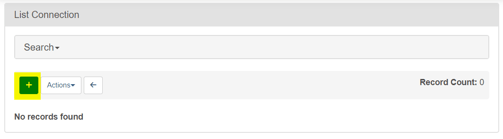
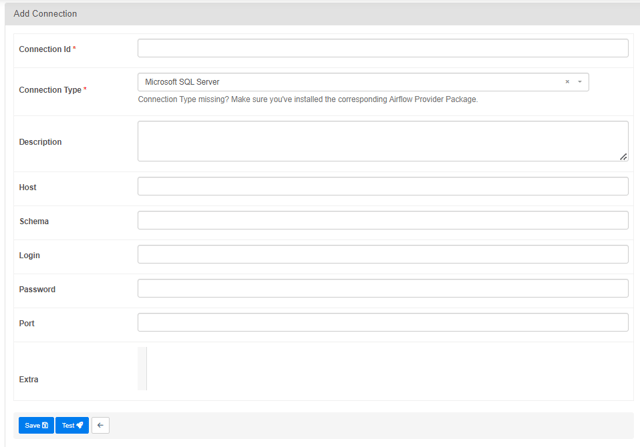
In the Airflow UI, the same connection is created under Admin > Connections with + (Add a new record): Connection Iddwh_azure_sql_conn, Connection Type Microsoft SQL Server, and Host, Schema, Login, Password and Port as above. Select Test; it showsConnection successfully testedwhen Airflow reaches the database. Then select Save.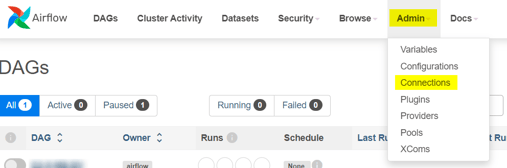



- Unpause the DAG:
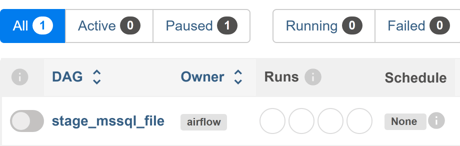
docker compose exec airflow-scheduler airflow dags unpause <dag id>. The DAG ID is the file name without_dag.py. In the Airflow UI, open DAGs and switch on the toggle left of the DAG.
- Trigger it:
docker compose exec airflow-scheduler airflow dags trigger <dag id>. The run starts in the statequeued. In the Airflow UI, select Trigger DAG in the column Actions.
Each Airflow task passes its own load timestamp: the time of the Airflow worker clock when the task calls its loader, as text with microseconds and without a time zone offset. The native load control instead uses one load timestamp for all loaders of an execution, see Microsoft SQL Server - Load data - Native Load Control.
Check the result
docker compose exec airflow-scheduler airflow dags list-runs -d <dag id> shows the run with the state success when all tasks succeeded. The log of each task lists the row counts of its loader, for example RowCountInserted: 33.
Example
The DAG stage_mssql_file of a Stage Files project has 10 loader tasks between the tasks begin and end. Each task calls one loader through the same connection:
op_kwargs = { 'StoProc':
  '[DWH].[st].[STG_ST_load_incremental_RawDataLoader]',
  'conn_id': 'dwh_azure_sql_conn'}
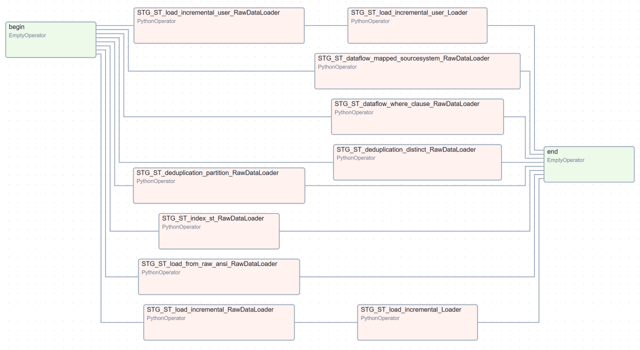
Here DWH and st are the example database and Stage schema. The task builds the timestamp with datetime.now() and passes it to the parameters @LoadTimestamp and @LoadEffectiveTimestamp of the loader.
Failure symptoms and recovery
The DAG shows an import error for the Microsoft SQL Server provider
Cause: The Airflow image does not contain apache-airflow-providers-microsoft-mssql.
Fix: Add the provider line to requirements.txt and rebuild the environment as described in Apache Airflow - Load control environment.
The DAG shows an import error for the Microsoft SQL Server operators
Message: ModuleNotFoundError: No module named 'airflow.providers.microsoft.mssql.operators'
Cause: The Airflow environment installed apache-airflow-providers-microsoft-mssql without a version limit and got version 4 or later, which no longer contains MsSqlOperator; the DAG imports it.
Fix: Pin the provider below version 4 in requirements.txt, for example apache-airflow-providers-microsoft-mssql<4, and rebuild the environment.
A task fails because the connection is missing
Cause: No Airflow connection has the ID dwh_azure_sql_conn.
Fix: Create the connection as in step 2. Then rerun the task and its downstream tasks: docker compose exec airflow-scheduler airflow tasks clear <dag id> -t "^<task id>$" -d -y.
Release differences
Double brackets in the DAG
Up to Generator 1.10, the DAG put an extra pair of brackets around each loader name. Since Generator 2.0 it writes single brackets. With a DAG of Generator 1.10 or earlier, open the file in an editor, replace [[ with [ and ]] with ], and save it. For example, this line:
'StoProc': '[[DWH].[rv].[RDV_HUB_CreditCard_Hub_Loader]]'
becomes:
'StoProc': '[DWH].[rv].[RDV_HUB_CreditCard_Hub_Loader]'
Related articles
- Previous: Microsoft SQL Server - Deployment, Apache Airflow - Load control environment
- Reference: LoadControl Options (Project), Configure LoadControl (Project), Microsoft SQL Server - Placeholder values
- See also: Understand Load Control, Microsoft SQL Server - Load data - Native Load Control, Microsoft SQL Server - Artifacts