
Applies to
Platform: Microsoft SQL Server
The artifacts of a Microsoft SQL Server generator are sqlcmd scripts plus PowerShell scripts that deploy and load them. This article explains what each file does and how the files call each other. Use it to find the script that failed and to see which project settings change the artifacts.
All nine Microsoft SQL Server generator configurations produce this structure. The layer scripts differ per configuration, and only Stage Files adds the folder Format.
Files in the artifacts folder
For example, the artifacts folder of a Stage Files project with Native Load Control:
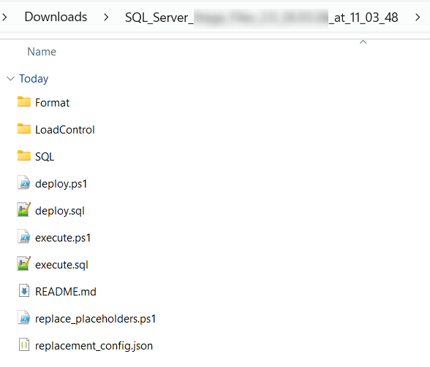
deploy.ps1: checks that sqlcmd is installed, asks for the server and the login, and runsdeploy.sqlwith sqlcmd. See Microsoft SQL Server - Deployment.deploy.sql: runsSQL\deploy_all_layers.sql, thenLoadControl\deploy_loadcontrol.sqlandLoadControl\configure_loadcontrol.sqlwhen the artifacts contain them, and lastSQL\validate_deployment.sql.execute.ps1andexecute.sql: with Native Load Control, they runLoadControl\LoadControl_Execution_<project>.sql, where<project>is the project name. See Microsoft SQL Server - Load data - Native Load Control.replace_placeholders.ps1andreplacement_config.json: replace the placeholders of all files. See Replace the placeholders in the artifacts.README.md: the generator and its version, the project, the branch and the build time.SQL\:deploy_all_layers.sql, one script per layer numbered in load order, for exampleL010_Stage.sqlandL020_Raw Vault.sql, andvalidate_deployment.sql.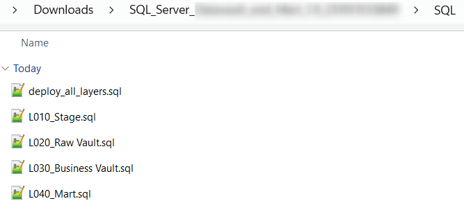
LoadControl\: the load control scripts or the Airflow DAG, depending on the project settings below.Format\: Stage Files only. One format file.fmtper Stage model object, which the loader uses to read the CSV files.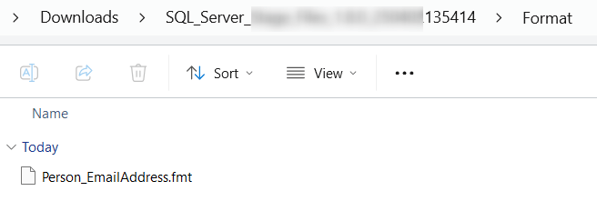
ParseError.log: only when the generation reported validation warnings; it lists them.
What the deployment scripts create
Each layer script switches to the database of its layer. It creates the database with the recovery model SIMPLE and the schema when they are missing. Then it creates the objects of each model object:
- Tables: with the default Deployment Options, each table is dropped and created again, empty. With
Generate Drop Table Statementscleared, only missing tables are created. - Views: dropped and created again.
- Stored procedures: the loaders, created with
CREATE OR ALTER PROCEDURE.
L000_Loadcontrol_Deployment.sql drops and creates the tables, views and procedures of the load control. The configuration scripts L010_Stage_Configuration.sql and following register the load objects and their dependencies.
SQL\validate_deployment.sql recompiles every generated view and stored procedure with sp_refreshsqlmodule. It prints Deployment validation succeeded. or Deployment validation found <number> errors. followed by error 50001.
Settings that change the artifacts
- LoadControl Options (Project): Native Load Control adds
execute.ps1,execute.sqlandLoadControl\LoadControl_Execution_<project>.sql. Airflow adds the DAGLoadControl\<project>_dag.py. With Airflow alone, the folderLoadControlholds only the DAG. - Deploy LoadControl (Project): true adds
deploy_loadcontrol.sqlandL000_Loadcontrol_Deployment.sql. - Configure LoadControl (Project): true adds
configure_loadcontrol.sql, oneL0x0_<layer>_Configuration.sqlper layer, the execution scripts and the DAG. With Configure LoadControl and Deploy LoadControl both false, the artifacts contain no folderLoadControland noexecute.ps1. - Deployment Options (Project): decides whether existing tables are dropped.
With Native Load Control and Airflow both selected, the folder LoadControl of a DataVault and Mart project holds the load control scripts, the execution script and the DAG:
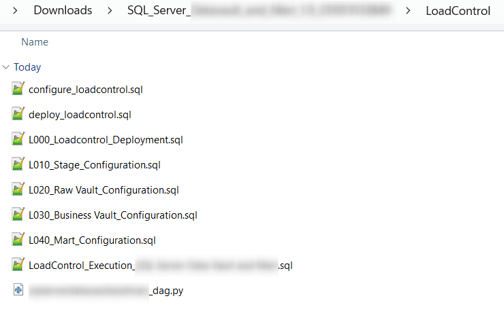
In the DAG file name, <project> is written in lower case with underscores, for example stage_mssql_file_dag.py.
Example
The Data Vault project Datavault.Mssql with Native Load Control and the default settings produces these files:
deploy.ps1
deploy.sql
execute.ps1
execute.sql
README.md
replace_placeholders.ps1
replacement_config.json
LoadControl\configure_loadcontrol.sql
LoadControl\deploy_loadcontrol.sql
LoadControl\L000_Loadcontrol_Deployment.sql
LoadControl\L010_Stage_Configuration.sql
LoadControl\L020_Raw Vault_Configuration.sql
LoadControl\L030_Business Vault_Configuration.sql
LoadControl\LoadControl_Execution_Datavault.Mssql.sql
SQL\deploy_all_layers.sql
SQL\L010_Stage.sql
SQL\L020_Raw Vault.sql
SQL\L030_Business Vault.sql
SQL\validate_deployment.sql
Its deploy.sql reads:
:r "SQL\deploy_all_layers.sql"
:r "LoadControl\deploy_loadcontrol.sql"
:r "LoadControl\configure_loadcontrol.sql"
:r "SQL\validate_deployment.sql"
Release differences
- Generator 2.2:
SQL\validate_deployment.sqlis added, see Generators Release - 2.2.0.
Related articles
- Previous: Generate artifacts, Download generated artifacts
- Next: Replace the placeholders in the artifacts
- Reference: Microsoft SQL Server - Placeholder values, LoadControl Options (Project), Deploy LoadControl (Project), Configure LoadControl (Project), Deployment Options (Project)
- See also: Microsoft SQL Server - Deployment, Understand Load Control, Troubleshoot generation, deployment and load failures, Generators Release - 2.2.0