
Applies to
Platform: Fabric Lakehouse
Prepare a Microsoft Fabric workspace for a Fabric Lakehouse project: a lakehouse with schemas, a service principal for the deployment and the source data. Afterwards you can deploy and load the generated artifacts. The setup applies to all Fabric Lakehouse generator configurations with the project property Target Platform set to Fabric, the default.
This article shows one possible setup. Microsoft Fabric offers many other configurations, which its documentation describes. For Target Platform Azure Synapse, see Azure Synapse - Target environment.
Prerequisites
- Access to Microsoft Fabric with a capacity on which you can create a workspace and lakehouses.
- A service principal, an application in Microsoft Entra ID, with a client secret.
Set up the environment
Create the workspace
- In Fabric, select Workspaces, then New workspace.
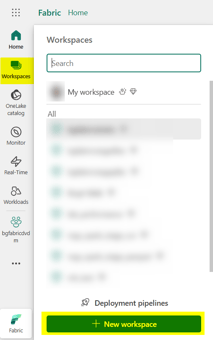
- Enter a name, for example
bgDocumentation, and select Apply.
- Select Manage access, then Add people or groups. Search for the service principal, choose the role Member and select Add.
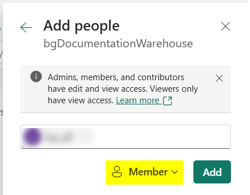
The Member role is sufficient for deploy.ps1. To keep the notebooks in Git, connect the workspace in its workspace settings under Git integration, as the Microsoft Fabric documentation describes.
Create the lakehouse
- In the workspace, select New item, then Lakehouse.

- Enter a name, for example
bg_lakehouse_doc, select Lakehouse schemas and create the lakehouse.
The deployment creates a schema for each layer and one for the load control, with the names of the placeholder values. deploy.ps1 needs at least one lakehouse in the workspace. Targets in a lakehouse with schemas need a default lakehouse with schemas, see Fabric Lakehouse - Deployment. If the default lakehouse that deploy.ps1 sets for the notebooks has no schemas, make a lakehouse with schemas their default lakehouse.
For targets in a lakehouse without schemas, leave schema_name empty for every layer and for the load control. Also clear Generate Create Schema If Not Exists Statements in Deployment Options.
Provide source data
A Fabric Lakehouse project gets its source data in one of three ways:
- Delta or Parquet files in OneLake, discovered directly in the project, see Discover Parquet or Delta files on OneLake.
- Files loaded by a Fabric Lakehouse Stage Files project, imported as a linked project.
- Database tables loaded over JDBC by a Fabric Lakehouse Stage JDBC project, imported as a linked project.
Files
Upload the source files into the Files folder of a lakehouse. In the context menu of the folder, choose Upload, then Upload folder.

The Stage loader reads the folder <file_path><source name>, where <source name> is the name of the source model object. Put each source in its own folder with that name, for example Files/Parquet/CreditCard/CreditCard.parquet for the source CreditCard:

A Delta source is a folder with the Delta table, named the same way:

The path up to the source folders is the placeholder value file_path.
Database
A Stage JDBC project reads tables of a database such as Microsoft SQL Server or PostgreSQL. The notebooks must reach the database from Fabric. For an Azure SQL Database, select Allow Azure services and resources to access this server in the networking settings of the server:

Check the result
The workspace contains the lakehouse with schemas, and Manage access lists the service principal as Member:
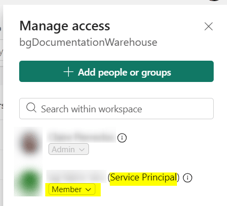
After the first deployment, the explorer of the lakehouse shows the schemas below Tables:

Upload artifacts in Microsoft Fabric
Uploading and running the generated notebooks with deploy.ps1 is described in Fabric Lakehouse - Deployment.
Failure symptoms and recovery
Failures of the deployment, such as a default lakehouse without schemas, are described in Fabric Lakehouse - Deployment. Load failures are described in Fabric Lakehouse - Load data - Native Load Control.
Related articles
- Next: Generate artifacts, Replace the placeholders in the artifacts, Fabric Lakehouse - Deployment
- Reference: Fabric Lakehouse - Placeholder values, Target Platform (Project)
- See also: Fabric Lakehouse Stage Files, Fabric Lakehouse Stage JDBC, Discover Parquet or Delta files on OneLake, Manage Linked Projects, Azure Synapse - Target environment