
Applies to
Platform: Databricks
The artifacts of a Databricks generator are Jupyter notebooks plus PowerShell scripts that upload and run them. This article explains what each file does and how the notebooks call each other. Use it to find the notebook that failed and to see which project settings change the artifacts.
All nine Databricks generator configurations produce this structure; the notebooks of the layers differ per configuration. The Databricks dbt configurations generate a dbt project instead, see Databricks dbt - Target environment.
Files in the artifacts folder
The download is a zip file. Unpacked, the artifacts folder of a Stage Files project contains:

Here <project> is the project name in lower case without spaces, with underscores for dots.
<project>_deploy.ipynb: the root deployment notebook. It runsLoadControl/<project>_deploy_loadcontroland thenJupyter/<project>_Deployment.deploy.ps1: uploads all notebooks into a workspace folder with the Databricks CLI and then runs the root deployment notebook as a job. See Databricks - Deployment.replace_placeholders.ps1andreplacement_config.json: replace the placeholders of all files. See Replace the placeholders in the artifacts and Databricks - Placeholder values.README.md: the generator and its version, the project, the branch, the scope and the build time.Helpers\:<project>_SelectResults.ipynb, which counts the rows of every result view and shows the latest load timestamp.
Jupyter\:<project>_Deployment.ipynb, the deployment notebooks<project>_deploy_1.ipynbto<project>_deploy_<number>.ipynb, and one notebook<loader>_Loader.ipynbper loader.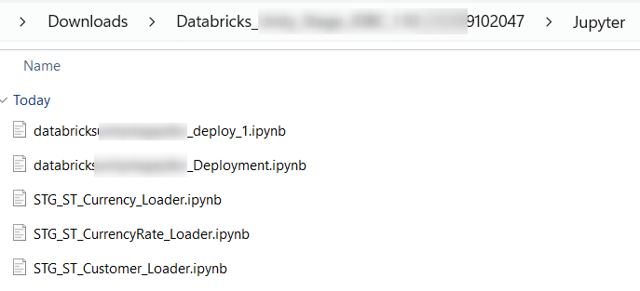
LoadControl\:<project>_deploy_loadcontrol.ipynband, depending on the settings below, the load notebook or the Airflow files.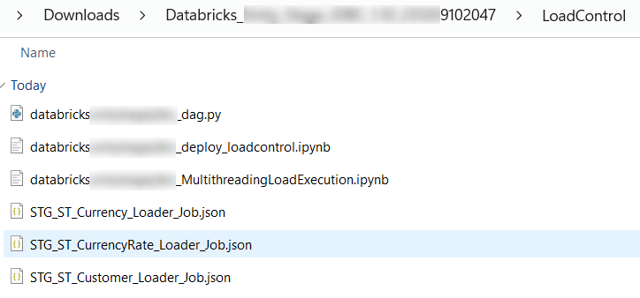
ParseError.log: only when the generation reported validation warnings; it lists them.
What the deployment notebooks create
<project>_deploy_loadcontrolcreates the load control schema when it is missing, and the log tablesexecution_loganddeployment_log.<project>_Deploymentruns the deployment notebooks one after the other. Each one holds up to Notebook Deployment Objects Limit objects.- Schemas: with Use Unity Catalog, each layer schema is created with
CREATE SCHEMA IF NOT EXISTS. With the Hive metastore, each layer database is created withCREATE DATABASE IF NOT EXISTS ... LOCATIONand itsdatabase_directory. - Tables: with the default Deployment Options, each table and both log tables are replaced by empty ones (
CREATE OR REPLACE TABLE). WithGenerate Drop Table Statementscleared, only missing tables are created (CREATE TABLE IF NOT EXISTS). - Views: replaced (
CREATE OR REPLACE VIEW), for example the result view<table>_result.
Each object writes a row into deployment_log: Successfully deployed, or Error during deployment of <object> with the error.
Settings that change the artifacts
- LoadControl Options (Project):
Multi-Threading Notebook, the default, addsLoadControl\<project>_MultithreadingLoadExecution.ipynb.Airflowadds the DAG<project>_dag.pyand one job file<loader>_Loader_Job.jsonper loader. - Configure LoadControl (Project): with
false, the DAG and the job files are not generated. - Deploy LoadControl (Project): with
false, the load notebook is not generated.<project>_deploy_loadcontrol.ipynbis always generated. - Apply Sensitivity Level Tags (Project):
trueaddsJupyter\<project>_apply_data_sensitivity_tags.ipynb. The root deployment notebook does not run it. - Deployment Options (Project) and Use Unity Catalog (Project): decide the statements described above.
Example
A Stage Files project named Stage Parquet Databricks with the default settings produces these files:
deploy.ps1
README.md
replace_placeholders.ps1
replacement_config.json
stageparquetdatabricks_deploy.ipynb
Helpers\stageparquetdatabricks_SelectResults.ipynb
Jupyter\stageparquetdatabricks_Deployment.ipynb
Jupyter\stageparquetdatabricks_deploy_1.ipynb
Jupyter\STG_ST_BRANCH_Loader.ipynb
Jupyter\STG_ST_CUSTOMER_Loader.ipynb
...
LoadControl\stageparquetdatabricks_deploy_loadcontrol.ipynb
LoadControl\stageparquetdatabricks_MultithreadingLoadExecution.ipynb
Its root deployment notebook has two cells. With the default folders and timeouts of the placeholder values, they read:
dbutils.notebook.run(
    f'LoadControl/stageparquetdatabricks_deploy_loadcontrol', 120, {})

dbutils.notebook.run(
    f'Jupyter/stageparquetdatabricks_Deployment', 3600,
    {"subfolder_path": "Jupyter"})
A Stage table in stageparquetdatabricks_deploy_1.ipynb starts with the placeholders of its catalog and schema:
CREATE OR REPLACE TABLE
  `{stageparquetdatabricks#stage#database_name}`
  .`{stageparquetdatabricks#stage#schema_name}`.`stg_st_branch` (
     `bg_sourcefilepath` String NOT NULL
    ,`bg_loadtimestamp` Timestamp NOT NULL
...
USING delta
Related articles
- Previous: Generate artifacts, Download generated artifacts
- Next: Replace the placeholders in the artifacts
- Reference: Databricks - Placeholder values, LoadControl Options (Project), Configure LoadControl (Project), Deploy LoadControl (Project), Deployment Options (Project), Notebook Deployment Objects Limit (Project), Apply Sensitivity Level Tags (Project), Use Unity Catalog (Project)
- See also: Databricks - Deployment, Databricks - Load data - Native Load Control, Databricks - Load data - Apache Airflow Load Control, Troubleshoot generation, deployment and load failures