
Applies to
Platform: Microsoft SQL Server · Snowflake · Databricks · Fabric Lakehouse · Fabric Warehouse · Oracle
Architecture: Data Vault
Use Embryo Loader (UseEmbryoLoader) adds business keys to a Hub or Link when a satellite or link delivers them before the Hub's or Link's own source does. Use it when satellites or links can deliver keys that the Hub's own source has not loaded yet. After the load, every row of such a relationship has its parent row in the Hub or Link.
Available since Generator 2.2. The Snowflake dbt and Databricks dbt generators do not offer it. In Dimensional and Data Mart, a fact row without a matching dimension row gets the unknown-member row instead, see Custom Singleton Values (Model Object).
Switch it on
Use Embryo Loader is a property of a relationship. The default is false.
- Open the action menu of the satellite or link and choose Manage Relationships.
- Open the action menu of the relationship to the Hub or Link and choose Edit Relationship.
- In the Implementation group, select Use Embryo Loader and choose SAVE.
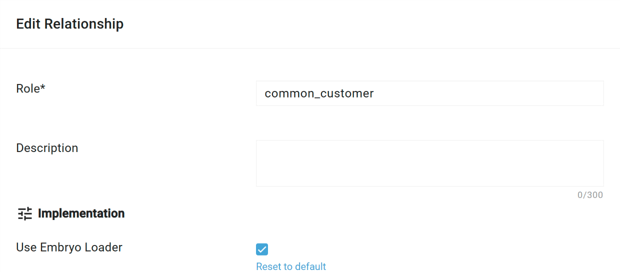
The property is available on relationships of these model object types:
- Links: Link, Same As Link, Hierarchical Link, Driving Key Link, Business Link, Same As Business Link, Hierarchical Business Link, Business Driving Key Link
- Satellites: Satellite, Multi-Active Satellite, Record Tracking Satellite, Effectivity Satellite, Non-Historized Satellite, Business Satellite, Effectivity Business Satellite, Non-Historized Business Satellite
- Link Satellites: Link Satellite, Record Tracking Link Satellite, Effectivity Link Satellite, Non-Historized Link Satellite, Business Link Satellite, Effectivity Business Link Satellite, Record Tracking Business Link Satellite, Non-Historized Business Link Satellite
When to use it
Without an Embryo Loader, a satellite row whose key is not in the Hub is loaded anyway and has no parent row. To log or stop such rows instead, use Missing Foreign Keys (Data Quality Rule).
Generated objects
Each model object with a selected relationship gets one Embryo Loader. In the load control it is the part <model object type> Embryo Loader, for example Satellite Embryo Loader.
| Platform | Generated loader |
|---|---|
| Microsoft SQL Server, Fabric Warehouse | Stored procedure <object name>_EmbryoLoader |
| Oracle | Package <OBJECT NAME>_EMBRYOLOADER |
| Snowflake | Procedure <OBJECT NAME>_EMBRYOLOADER |
| Databricks, Fabric Lakehouse | Notebook <object name>_EmbryoLoader |
Here <object name> is the table name of the model object, for example RDV_SAT_customer_sat. On Snowflake, the load control adds the task LC_<OBJECT NAME>_EMBRYOTASK.
The loader reads the keys of the current load from the object's hashing view, or from its hashing table with Load Caching. It inserts, or seeds, each key whose hash key is not yet in the related Hub or Link table, in one transaction. The new row gets the load timestamp of the run, the hash key, the business key and the BG_SourceSystem of the delivering object. The Embryo Loader of a Link seeds its Hubs. With Use Embryo Loader selected on the Link Satellite's relationship to its Link and on the Link's relationships to its Hubs, the Embryo Loader of the Link Satellite seeds the Link and those Hubs.
Load order
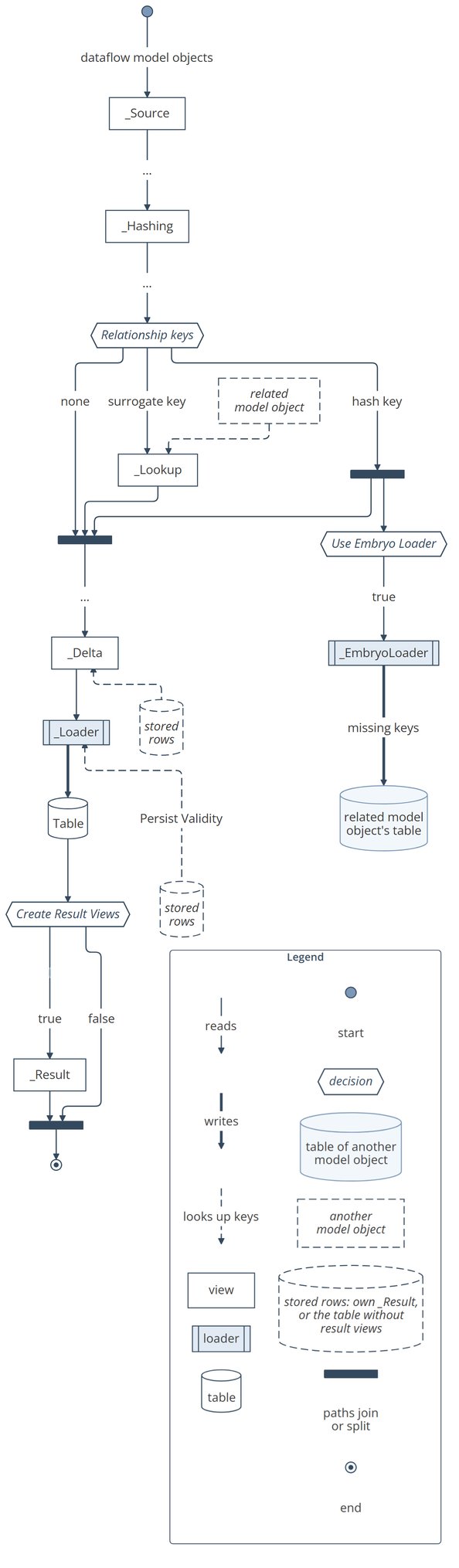
The Embryo Loader runs after the Loader of each Hub or Link it seeds and before the Loader of its own object. Embryo Loaders that seed the same Hub run one after another. A key that the Hub's own source delivers later is not loaded again, so the row keeps its BG_SourceSystem and load timestamp.
The diagram shows the Embryo Loader in the part flow; the legend in the image names the lines and shapes. Generated parts of model objects describes it:
Interactions and limitations
- Missing Foreign Keys on the same relationship checks the key before the Embryo Loader adds it. With Load cleared, the rule logs the row and stops it, so the Embryo Loader does not add its key. With Load selected, the rule logs the row and the Embryo Loader adds the key. Generation reports a validation warning for this rule on Data Vault relationships, because related objects can load in parallel.
- The unknown-member row of a Hub comes from the deployment script. The Embryo Loader never changes it.
- The business key of a Hub is unique. A source key equal to the business key of the unknown-member row makes the Embryo Loader fail; see Custom Singleton Values (Model Object).
Example
The stage CUSTOMER delivers customers 941, 950, 951, 960 and 980. Each model object loads only some of them, and each sets BG_SourceSystem to a short name such as hub or sat:
- Hub
embryo_customer:941 - Link
embryo_customer_link:941,951 - Link Satellite
embryo_customer_lsaton that Link:941,960 - Satellites
embryo_customer_sat:941,950, andembryo_customer_sat2:941,980
All relationships have Use Embryo Loader selected. After one load on Microsoft SQL Server, the Hub contains:
CUSTOMER_ID  BG_SourceSystem  BG_LoadTimestamp
0            Unknown          1900-01-01 00:00
941          hub              2026-10-27 10:00
950          sat              2026-10-27 10:00
951          link             2026-10-27 10:00
960          lsat             2026-10-27 10:00
980          sat2             2026-10-27 10:00
Check the result
On Microsoft SQL Server, each Embryo Loader returns the inserted rows in its @RowCountInserted output. A second load of the same data inserts 0 rows. Every satellite row has a Hub row with the same hash key:
SELECT COUNT(*) AS rows_without_hub
FROM RDV_SAT_embryo_customer_sat AS s
WHERE NOT EXISTS (
  SELECT 1 FROM RDV_HUB_embryo_customer AS h
  WHERE h.Hub_HK = s.Hub_HK);
The query returns 0. With Use Embryo Loader cleared on this relationship, it returns 1, because the Hub has no row 950.
Release differences
- Generator 2.2: Use Embryo Loader is introduced.
- Generator 2.4: Non-Historized Satellite and Non-Historized Business Satellite support it.