
Applies to
Platform: Microsoft SQL Server · Snowflake · Snowflake dbt · Databricks · Databricks dbt · Fabric Lakehouse · Fabric Warehouse · Oracle
Architecture: Data Vault · Dimensional · Data Mart
Custom Singleton Values (CustomSingletonValues) sets your own values in the unknown-member row of a model object, also called the singleton. Use it to show a value such as No customer instead of Unknown. After deployment, the unknown-member row carries your values.
Available since Generator 2.3 on Entity, Mart Dimension, and the Data Vault types Hub, Link, Same As Link, Hierarchical Link, Driving Key Link, Satellite, Multi-Active Satellite, Link Satellite and their Business Vault counterparts.
Values
In Edit Model Object, group Singleton, choose Add Term, select a term and enter its value without quotes. Terms you do not add, and empty values, keep their default.
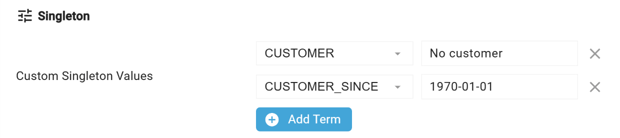
- Longer values are cut to the term's length.
- On Oracle, enter dates as
YYYYMMDDand timestamps asYYYYMMDDHH24MISS, for example19700101153000.
biGENIUS-X does not check the value against the term's data type. A value that the platform cannot convert makes the deployment script fail.
The surrogate key, hash keys and a stored BG_ValidToTimestamp keep their default values; a value entered for them has no effect.
Defaults
- Surrogate key:
-1 - Hash keys: the zero hash, see How biGENIUS-X builds hash values
- Text:
Unknown; numbers:0 - Dates and timestamps: Begin of Universe
BG_ValidToTimestamp, stored with Persist Validity: End of Universe
Effect on generated output
The table script inserts the unknown-member row unless a row with its surrogate key, or in Data Vault its zero hash key, exists.
A Fact or Mart Fact row without a matching dimension row gets the surrogate key -1, so it shows your values. Keys missing from a Hub or Link are added by the Embryo Loader, which never changes the unknown-member row. A Hub's business key is unique, so a source key equal to the unknown member's business key makes the Hub Loader or Embryo Loader fail.
The unknown-member row has the business key 0 for numbers and Unknown for text. If a source can deliver that value, set another value with Custom Singleton Values, for example -1.
Example
A Mart Dimension custom_singleton_values has No customer for CUSTOMER and -99 for the surrogate key CUSTOMER_SK. After a load of customers 1 Alice and 2 Bob, the table contains:
CUSTOMER_SK  CUSTOMER_ID  CUSTOMER
-1           0            No customer
1            1            Alice
2            2            Bob
The surrogate key stays -1. The Mart Fact singleton_fact then loads customers 1, 2 and 3 Carol. Customer 3 is not in the dimension:
SELECT f.CUSTOMER_NAME, d.CUSTOMER_SK, d.CUSTOMER
FROM DM_MF_singleton_fact AS f
JOIN DM_MD_custom_singleton_values AS d
  ON d.CUSTOMER_SK = f.custom_singleton_values_SK;

CUSTOMER_NAME  CUSTOMER_SK  CUSTOMER
Alice          1            Alice
Bob            2            Bob
Carol          -1           No customer
Change values in a deployed solution
With Deployment Options set to Generate Drop Table Statements, the default, the deployment recreates the table with the new row; all other rows are deleted. Without drop statements, the existing row keeps its old values. Update the row in the target table yourself, for example with an UPDATE on the row whose surrogate key is -1, in Data Vault whose hash key is the zero hash. A Mart Dimension with Implementation Type Cached writes the row again with each load and has the new values after the next load.
Failure symptoms and recovery
Validation reports a value for a missing term
Message: Model object '<model object name>' of type '<model object type>' has a custom singleton value configured for term with id '<term ID>', but no corresponding term could be found on the model object.
Cause: the term was deleted.
Fix: remove its value in Edit Model Object.
Release differences
- Generator 2.3: Custom Singleton Values is introduced.
- Generator 2.4: Oracle converts timestamp values with
YYYYMMDDHH24MISSinstead ofYYYYMMDD.