
Applies to
Platform: Snowflake
Load the deployed Snowflake solution with the native load control: Snowflake tasks that call the generated loaders. Start the tasks once or on a schedule with the helper script of the artifacts. Afterwards the task history lists every task run with its state.
The LoadControl Options of the project decide which tasks the deployment creates. To load several linked projects in order, see Snowflake - Load data - Linked projects.
Prerequisites
- LoadControl Options contains
Depending Tasks,Stage-Driven TasksorNear-Realtime Tasks, and Configure LoadControl istrue. - The artifacts are deployed without errors, including the task script.
- A Snowsight worksheet or SnowSQL, with a role that owns the tasks and has the account privilege
EXECUTE TASK, see Snowflake - Target environment.
Generated tasks
The deployment creates the tasks suspended, in the load control schema of the placeholder values:
- Depending Tasks: one task graph. The root task
LOAD_<PROJECT>_ROOT_TASKhas the schedule ofload_interval, 5 minutes by default. One task per loader,LC_<object>orLC_<object>_TASK, runs after the tasks of its sources, andLOAD_<PROJECT>_END_TASKruns last.<PROJECT>is the project name in upper case with underscores for dots. All loaders of a run get the start time of the root task as load timestamp. - Stage-Driven Tasks: one task per Stage model object,
LC_STG_ST_<object>_TASK, with the schedule ofload_interval. It calls the Stage loader and then the loaders of all objects that depend on it, with its own start time as load timestamp. When a source of a dataflow has the property Ignore Downstream Dependencies, the task of that Stage object does not call the loader of the dataflow. - Near-Realtime Tasks: one task per loader, see Near-Realtime Tasks.
After suspend_task_after_num_failures failed runs, 1 by default, Snowflake suspends the root task or the stage-driven task.
Load with depending tasks
Open LoadControl\snowflake_depending_tasks_helper.sql of the replaced artifacts in a worksheet. Its first block, Enable all tasks, suspends the root task and sets the log level of the root and end tasks to INFO. Run this block first.
Load once
- In the block To manually execute the root task directly, remove the comment marks
--of the statements. - Run the block. It removes the schedule of the root task, resumes the child tasks through a temporary parent task and starts the graph:
ALTER TASK <root task> UNSET SCHEDULE; CREATE OR REPLACE TASK TEMP_PARENT_TASK WAREHOUSE = '<warehouse>' AS SELECT 1; ALTER TASK <root task> ADD AFTER TEMP_PARENT_TASK; SELECT SYSTEM$TASK_DEPENDENTS_ENABLE('<root task>'); ALTER TASK <root task> REMOVE AFTER TEMP_PARENT_TASK; DROP TASK TEMP_PARENT_TASK; EXECUTE TASK <root task>;Here<root task>isLOAD_<PROJECT>_ROOT_TASKand<warehouse>is the load control warehouse. - To load again later, run only
EXECUTE TASK <root task>;.
Load on a schedule
- To change the interval, or after Load once, remove the comment marks of
ALTER TASK <root task> SET SCHEDULE = '15 MINUTE';, adapt the value and run the line. - Remove the comment marks of
CALL SYSTEM$TASK_DEPENDENTS_ENABLE('<root task>');and run the line. It resumes the root task and all child tasks; the graph then runs at each interval. - To stop loading, run the last block of the helper,
ALTER TASK <root task> SUSPEND;.
Load with stage-driven tasks
- Open
LoadControl\snowflake_stage_driven_tasks_helper.sqlin a worksheet. - In the block Execute all tasks, run the
EXECUTE TASK LC_STG_ST_<object>_TASK;lines of the Stage objects to load. Each task runs once. - To load on the schedule instead, resume the tasks with
ALTER TASK LC_STG_ST_<object>_TASK RESUME;, and suspend them withSUSPENDto stop.
Near-Realtime Tasks
Near-Realtime Tasks is a preview feature. It covers loading with Snowflake streams and tasks.
For each dataflow with Use Stream, the layer script creates a view <object>_SOURCE_STREAMSOURCE and an append-only stream <object>_SOURCE on it. snowflake_tasks_streams.sql creates one task per loader with the schedule of load_interval and a WHEN condition with SYSTEM$STREAM_HAS_DATA. Use Stream is not available on PIT and Business PIT. This article does not describe the loading steps for Near-Realtime Tasks.
Check the result
The helpers contain the monitoring queries. Replace <YOUR_TIMESTAMP> with the start of your load, in the format YYYY-MM-DD HH24:MI:
- Which is the DAG that is currently scheduled or is executing: the running or scheduled graphs.
- Returns the history of a DAG or task: each task run with its state and its start and end times. The load succeeded when the end task and all other tasks show
SUCCEEDEDin the columnSTATE.
- Show logging events for the loaders: the log events of the loaders, read from the event table
LOGGING.AUDIT.EVENTS.
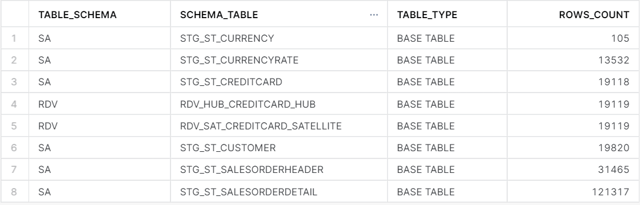
To count the loaded rows per table, run in the target database, with your schemas:
SELECT table_schema, table_name, row_count
FROM <database>.information_schema.tables
WHERE table_type = 'BASE TABLE'
  AND table_schema IN ('SA', 'RDV', 'BV')
ORDER BY row_count;
Failure symptoms and recovery
EXECUTE TASK runs only the root task
Cause: The child tasks are suspended. EXECUTE TASK skips suspended child tasks.
Fix: Run the block To manually execute the root task directly as in Load once.
A task failed and the graph no longer runs
Cause: A loader failed. After suspend_task_after_num_failures failed runs, Snowflake suspends the root task.
Fix: Read ERROR_MESSAGE of the failed run in TABLE(INFORMATION_SCHEMA.TASK_HISTORY()), correct the cause and resume the graph with SYSTEM$TASK_DEPENDENTS_ENABLE.
The logging query finds no event table
Cause: The account has no event table LOGGING.AUDIT.EVENTS.
Fix: Replace the table name in the query with the event table of your account.
For failures in other steps, see Troubleshoot generation, deployment and load failures.
Release differences
Helper for stage tasks
In Generator 1.8, the artifacts contained no helper for the stage-driven tasks. Since Generator 1.9 they contain snowflake_stage_driven_tasks_helper.sql. With artifacts of Generator 1.8, use Helper_Snowflake_Stage_Driven_v2.sql and replace its placeholders with your database and load control schema.
Related articles
- Previous: Snowflake - Deployment
- Next: Snowflake - Load data - Linked projects
- Reference: LoadControl Options (Project), Configure LoadControl (Project), Use Stream (Model Object), Snowflake - Placeholder values, Ignore Downstream Dependencies (Dataflow Model Object)
- See also: Understand Load Control, Native - Load control environment, Snowflake - Load data - Apache Airflow Load Control, Snowflake - Artifacts