
Applies to
Platform: Fabric Lakehouse
Fabric Lakehouse placeholder values name the lakehouses, schemas, source paths and connections of a Fabric Lakehouse project. Enter them in replacement_config.json before you run replace_placeholders.ps1. Afterwards the notebooks contain your names.
The replacement itself is described in Replace the placeholders in the artifacts. For Target Platform Azure Synapse, see Azure Synapse.
Variable names
Each variable name has the form <project>#<group>#<variable>, with the project name in lower case. The group is a layer, such as stage or rawvault, or a source system in lower case without spaces. Variables in the section Other variables have no project name.
Layers and source systems
workspace_name
The Fabric workspace of the lakehouse. Leave it empty for a lakehouse in the workspace of the notebooks; the replacement removes the empty name with its dot.
database_name
The lakehouse of the layer. The generated file presets datalakehouse for every layer. For a source system, the lakehouse of the source tables, for example of a linked Stage project.
schema_name
The schema in the lakehouse, empty in the generated file. With Generate Create Schema If Not Exists Statements selected, the default, enter a schema for every layer: an empty schema_name makes the deployment fail, in a lakehouse with or without schemas. The default lakehouse of the notebooks must then have schemas. For targets in a lakehouse without schemas, clear Generate Create Schema If Not Exists Statements in Deployment Options and leave schema_name empty for every layer and for the load control. For source tables in a lakehouse without schemas, leave it empty or enter dbo.
file_path
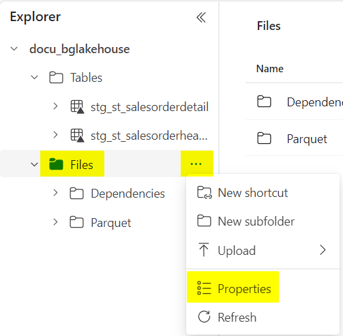
Stage Files only: the ABFS path of the folder that holds one folder per source, ending with a slash. The loader reads <file_path><source name>. To copy the path, open the context menu of the Files folder of the lakehouse, choose Properties and copy ABFS path. Then append your folders, for example:
abfss://<workspace>@onelake.dfs.fabric.microsoft.com/
  <lakehouse>.Lakehouse/Files/Parquet/
Write the path on one line.
JDBC connection
Stage JDBC only: jdbc_url, jdbc_driver, jdbc_user and jdbc_password. The generated file presets SQL Server examples. The loader inserts jdbc_user and jdbc_password as Python expressions. Write a literal in single quotes, for example '<user name>', or read a secret from Azure Key Vault without quotes:
PyTridentTokenLibrary.get_secret_with_token(
  '<Key Vault URL>', '<secret name>', access_token)
Write it on one line. The identity that runs the notebook needs read access to the secret. A missing secret stops the loader with 404 SecretNotFound.
Other variables
loadcontrol#loadcontrol#database_nameandschema_name: the lakehouse and schema of the log tables; presetdatalakehouseand empty. The rule for an emptyschema_nameabove applies here too.execution_log_table_nameanddeployment_log_table_name: presetexecution_loganddeployment_log.application_nameandapplication_environment_name: written to every log row; preset empty andDEV.deployment_objects_timeoutanddeployment_loadcontrol_timeout: seconds for the deployment and the load control deployment; preset3600and120.run_notebook_timeout: seconds each loader notebook may run in the native load control; preset3600.airflow#airflow#fabric_conn_id: the Airflow connection of the DAG; presetfabric-integration.
Give each project its own load control lakehouse or schema (placeholders loadcontrol#loadcontrol#database_name and schema_name). With the default Deployment Options, a project that deploys the load control into the same location replaces the logs of the other projects.
Example
A DataVault and Mart project test.vaultandmart.spark.fabric deploys its Stage to the lakehouse my_lakehouse, which has schemas, with the example schema stage:
{ "name": "test.vaultandmart.spark.fabric#stage#workspace_name",
  "value": "", "secretname": "" },
{ "name": "test.vaultandmart.spark.fabric#stage#database_name",
  "value": "my_lakehouse", "secretname": "" },
{ "name": "test.vaultandmart.spark.fabric#stage#schema_name",
  "value": "stage", "secretname": "" }
After the replacement, the Stage table is `my_lakehouse`.`stage`.`stg_st_item`.
Example files: Stage Files, Stage JDBC, Data Store, Dimensional and Mart, DataVault and Mart.
Azure Synapse
With Target Platform Azure Synapse, the layers and the load control are databases in a storage account, without workspace_name. These values differ:
database_name: the database of the layer, preset with the layer name, for examplerawvault. For a source system, the database that holds the source tables.database_directory: the storage path of the database, ending with a slash, for exampleabfss://<container>@<storage account>.dfs.core.windows.net/rawvault/. The notebooks runCREATE DATABASE IF NOT EXISTS ... LOCATIONwith it.schema_name: leave it empty for the layers; the replacement removes it with its dot. In a Stage JDBC project, enter the schema of the source tables for the source system.loadcontrol#loadcontrol#database_nameanddatabase_directory: empty in the generated file. Enter a database name and a path.file_path: the storage path of the source folders, in the same form.jdbc_userandjdbc_password: a literal in single quotes.datafactory_pipeline#datafactory_pipeline#variables: settings of the pipelines for Apache Airflow.
Example files: Stage Files, Stage JDBC, Data Store, Dimensional and Mart, DataVault and Mart.
Release differences
- Generator 2.2:
airflow#airflow#fabric_conn_idand thedatafactory_pipelinevariables, with LoadControl OptionsAirflow. - Generator 2.0: with Target Platform
Fabric,database_nameis preset withdatalakehouse.
Legacy placeholders
Up to Generator 1.10, Fabric projects also had database_directory, which you left empty. Generator 1.9 had log_table_name; since Generator 1.10 it is execution_log_table_name and deployment_log_table_name. Generator 1.8 had execution_dependencies_file_path.
Related articles
- Previous: Fabric Lakehouse - Target environment, Azure Synapse - Target environment, Download generated artifacts
- Next: Fabric Lakehouse - Deployment, Azure Synapse - Deployment
- See also: Replace the placeholders in the artifacts, Fabric Lakehouse - Artifacts, Fabric Lakehouse - Load data - Native Load Control