
Applies to
Platform: Fabric Lakehouse
The artifacts of a Fabric Lakehouse generator are Fabric notebooks, PowerShell scripts and, with Apache Airflow, a DAG file. This article explains what each file does and which project settings change the artifacts. Use it to find the notebook that failed and to see what a deployment creates.
All nine Fabric Lakehouse generator configurations produce this structure, from Stage to Dimensional and Mart. With Target Platform Azure Synapse, the differences are listed in Azure Synapse.
Files in the artifacts folder
For example, the artifacts folder of a Dimensional and Mart project:
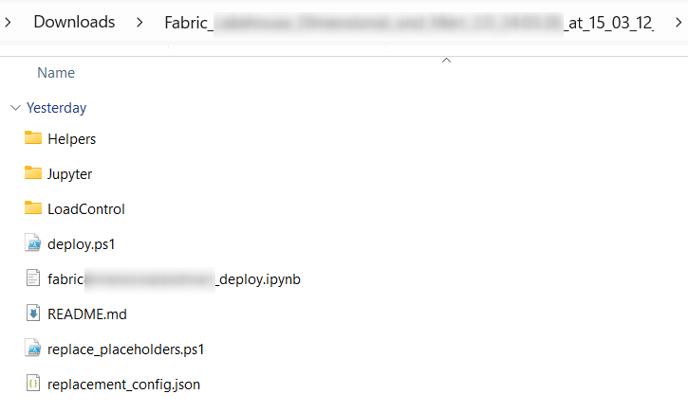
deploy.ps1: uploads the notebooks to a Fabric workspace, sets their default lakehouse and runs<project>_deploy. See Fabric Lakehouse - Deployment.<project>_deploy.ipynb: runs the load control deployment notebook, then<project>_Deployment.replace_placeholders.ps1andreplacement_config.json: replace the placeholders of all files. See Fabric Lakehouse - Placeholder values.README.md: the generator and its version, the project, the branch, the build time, and the number of model objects, deployment objects and validation warnings.ParseError.log: only when the generation reported validation warnings; it lists them.Helpers\<project>_SelectResults.ipynb: lists each result view with its row count and newest load timestamp.Jupyter\<project>_Deployment.ipynb: runs the deployment notebooks one after the other and reports at the end how many of them failed.Jupyter\<project>_deploy_<number>.ipynb: the deployment notebooks. Each cell holds the statements of one deployment step. A notebook holds at most as many cells as Notebook Deployment Objects Limit allows,100by default.Jupyter\<loader>.ipynb: one notebook per loader, for exampleSTG_ST_ITEM_Loader.ipynb.LoadControl\<project>_deploy_loadcontrol.ipynb: creates the schema of the load control and the log tablesexecution_loganddeployment_logas Delta tables.LoadControl\<project>_MultithreadingLoadExecution.ipynb: loads the data, see Fabric Lakehouse - Load data - Native Load Control.LoadControl\<project>_dag.py: the Airflow DAG, see Fabric Lakehouse - Load data - Apache Airflow Load Control.
In the file names, <project> is the project name in lower case, with underscores in place of dots and without spaces, for example test_vaultandmart_spark_fabric.
What the deployment notebooks create
Each cell writes to `<lakehouse>`.`<schema>` of its layer. With the default Deployment Options, the first cell of a layer creates its schema with CREATE SCHEMA IF NOT EXISTS. Then the cells create the objects of each model object:
- Tables: Delta tables, created with
CREATE OR REPLACE TABLE, which empties them. With Generate Drop Table Statements cleared,CREATE TABLE IF NOT EXISTScreates only missing tables. - Views: the result views and other views, created with
CREATE OR REPLACE VIEW. - Unknown-member rows: inserted into the tables that have one, for example Hubs and Satellites.
The load control deployment notebook follows the same option: CREATE OR REPLACE TABLE empties both log tables, and CREATE TABLE IF NOT EXISTS keeps them.
Settings that change the artifacts
- LoadControl Options (Project):
Multi-Threading Notebookadds the load notebook;Airflowadds the DAG. - Deploy LoadControl (Project):
falseremoves only the load notebook<project>_MultithreadingLoadExecution.ipynb. - Configure LoadControl (Project):
falseremoves only the DAG and, with Azure Synapse, the pipeline files. - Logging Method (Project): the load control deployment notebook exists only with the value
Delta Table. - Deployment Options (Project): decides whether tables and log tables are replaced and whether schemas are created.
Azure Synapse
With Target Platform Azure Synapse, the artifacts contain no deploy.ps1. Each layer and the load control are a database, which the notebooks create with CREATE DATABASE IF NOT EXISTS ... LOCATION, whatever the Deployment Options say about schemas. With Airflow, the folder LoadControl also holds one Synapse pipeline definition per loader, <loader>_Pipeline.json.
Example
A DataVault and Mart project test.vaultandmart.spark.fabric with a Stage, a Hub and a Satellite has these artifacts:
deploy.ps1
ParseError.log
README.md
replace_placeholders.ps1
replacement_config.json
test_vaultandmart_spark_fabric_deploy.ipynb
Helpers\
  test_vaultandmart_spark_fabric_SelectResults.ipynb
Jupyter\
  RDV_HUB_ITEM_Loader.ipynb
  RDV_SAT_ITEM_Loader.ipynb
  STG_ST_ITEM_Loader.ipynb
  test_vaultandmart_spark_fabric_deploy_1.ipynb
  test_vaultandmart_spark_fabric_Deployment.ipynb
LoadControl\
  test_vaultandmart_spark_fabric_deploy_loadcontrol.ipynb
  test_vaultandmart_spark_fabric_MultithreadingLoadExecution.ipynb
The notebook test_vaultandmart_spark_fabric_deploy_1 has 19 cells. README.md reports 15 validation warnings, which ParseError.log lists.
Release differences
- Generator 2.2: LoadControl Options
Airflowadds the DAG. - Generator 1.10: the notebook
<project>_deploy.ipynb. Up to Generator 1.9 you ran the deployment from a notebook of your own, see Fabric Lakehouse - Deployment. - Generator 1.9:
deploy.ps1andLoadControl\<project>_Deployment_LoadControl.ipynb. - Generator 1.8:
LoadControl\bg_<project>_dependencies.jsonand, withSequential Notebook,<project>_SimpleLoadExecution.ipynb, see Fabric Lakehouse - Load data - Native Load Control.
Related articles
- Previous: Generate artifacts, Download generated artifacts
- Next: Replace the placeholders in the artifacts, Fabric Lakehouse - Deployment, Azure Synapse - Deployment
- Reference: Fabric Lakehouse - Placeholder values, LoadControl Options (Project), Deploy LoadControl (Project), Configure LoadControl (Project), Deployment Options (Project), Notebook Deployment Objects Limit (Project)
- See also: Fabric Lakehouse - Load data - Native Load Control, Fabric Lakehouse - Load data - Apache Airflow Load Control, Understand Load Control