
Applies to
Platform: Microsoft SQL Server · Snowflake · Databricks · Fabric Lakehouse · Fabric Warehouse
Architecture: Dimensional
An Entity stores data per business key in a Core layer table, with an integer surrogate key and the history of its SCD2 terms. Use it for the dimensions and reference data that Facts and other Entities reference. After each load, the result view shows one row per business key and version.
Sources and relationships
An Entity reads Stages, Core Composites and Store Entities of a linked Data Store project, in one or more dataflows.
- Relationships: an Entity can reference other Entities, and itself for a hierarchy. See Use parent-child relationships.
- Readers: Facts and other Entities reference it. Mart Composites, Mart Dimensions and Mart Facts read it in a Dimensional and Mart project, or as a linked object in a Data Mart project.
Create an Entity
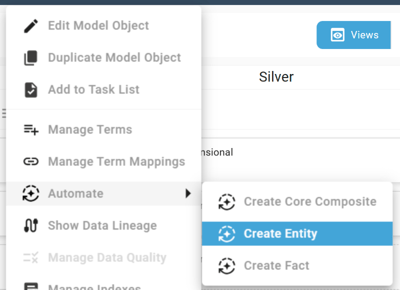
- With the wizard: open the menu of a Stage, Core Composite or Store Entity, choose Automate and then Create Entity. The wizard gives the mapped terms the Historization Type SCD2. See Create a Model Object with the wizard.
- Manually: create a model object of type Entity in the Dimensional column, create a dataflow set, add the source model objects and map the terms. Mark at least one term as business key, and add a relationship to each referenced Entity.
In both cases, set the Historization Type of the terms and relationships that are not SCD2.
Historization
- SCD2 (default): a changed value starts a new version at the load timestamp.
- SCD1: a new value overwrites the term in every version of the business key.
- SCD0: the value of the first load is kept.
The first version of a business key starts at 1900-01-01 (Begin of Universe). A version ends where the next one starts; the current version ends at 9999-12-31 (End of Universe). When the terms mix Historization Types, validation reports the warning uses mixed historization types. The load still runs. See Change detection and historization.
Properties
- Implementation Type:
Permanentonly, a table that keeps its rows from load to load. - Delta Detection:
Hash Value Comparison(default) compares row hashes.Column Comparisoncompares the SCD1 and SCD2 terms column by column. - Load Caching: no value (default) or
Hashing, which stores the hashing view in a table before the loader runs. - Custom Singleton Values: values of the unknown-member row for selected terms.
- Foreign Key Mode: foreign key constraints to the referenced Entities; default
Create Disabled. - Deduplication Method and Sort Order within Partition, per dataflow.
Partitionkeeps one row per business key.
The project properties Persist Validity and Create Result Views decide whether BG_ValidToTimestamp is a table column and whether the result view exists.
Default Terms
<model object name>_SK(BG_Entity_Identity): the integer surrogate key and primary key.<referenced Entity>_<role>_SK(BG_Entity_ForeignKey_Identity): one per relationship, the surrogate key of the referenced Entity.BG_LoadTimestampandBG_UpdateTimestamp: the load that inserted the row and the load that last changed it.BG_SourceSystem: the source system of the row; empty unless you map it.BG_ValidFromTimestampandBG_ValidToTimestamp: only when a term or relationship has SCD2. The business keys andBG_ValidFromTimestampform a unique constraint.BG_EffectiveTimestamp: the point in time that selects the version of a referenced historized Entity.BG_RowHashScd1andBG_RowHashScd2: hashes of the SCD1 and of the SCD2 terms, each only when such terms exist. Business keys, Default Terms and SCD0 terms are not hashed. See How biGENIUS-X builds hash values.BG_DataQuality_ID,BG_ErrorCountandBG_ErrorDescription: hidden terms of the data quality objects.
Deployment inserts an unknown-member row with the surrogate key -1, Unknown for text, 0 for numbers and 1900-01-01 for dates. A Fact or Entity row whose foreign key finds no match references this row.
Generated objects
These are the names on Microsoft SQL Server for an Entity loyaltycard with one dataflow:
| Role | Generated name | Purpose |
|---|---|---|
| Source | CLS_EN_loyaltycard_Source | Joins and maps the sources |
| Deduplication | CLS_EN_loyaltycard_Deduplication | Removes duplicate rows |
| Hashing | COR_EN_loyaltycard_Hashing | Calculates the row hashes |
| HashingStorage | COR_EN_loyaltycard_HashingTable | Stores the row hashes |
| HashingLoader | COR_EN_loyaltycard_HashingLoader | Fills the hashing table |
| Lookup | COR_EN_loyaltycard_Lookup | Finds referenced surrogate keys |
| Delta | COR_EN_loyaltycard_Delta | Selects new and changed rows |
| Loader | COR_EN_loyaltycard_Loader | Loads the table |
| Storage | COR_EN_loyaltycard | Entity table |
| Result | COR_EN_loyaltycard_Result | Query view with validity |
CLS_objects are in the Cleanse layer,COR_objects in the Core layer. Loaders are stored procedures; the Entity table and the hashing table are tables; all other objects are views.- The deduplication view exists only with a Deduplication Method other than
None. - The hashing view exists only with
Hash Value Comparisonand at least one SCD1 or SCD2 term. The hashing table and hashing loader exist only with Load CachingHashing. - A data quality rule that runs before the load adds
_DataQualityBeforeLoadAction,_DataQualityResult,_DataQualityTableand_DataQualityLoaderin the Cleanse layer. Rule logging adds_DataQualityError. - With several dataflows, all objects except the table and the result view exist once per dataflow, with the dataflow name in their names.
With the default settings, the dependencies are:
sources -> CLS_EN_loyaltycard_Source -> _Hashing -> _Lookup
_Lookup -> _Delta -> _Loader -> COR_EN_loyaltycard -> _Result
_Result -> _Delta (comparison with the stored rows)
Example
The Entity loyaltycard on Microsoft SQL Server reads the Stage loyaltycard. LOYALTYCARD_ID is the business key. The example uses these terms:
CUSTOMER_ID: SCD2.CARD_NUMBER: SCD1.IS_ACTIVE: SCD0.
Load 1 on 2026-10-28 08:00 delivers card 500 (number 4711, customer 1, IS_ACTIVE 1) and card 501 (number 4712, customer 2, IS_ACTIVE 1). Load 2 on 2026-10-29 08:00 changes card 500 to number 4811, customer 3, IS_ACTIVE 0.
Check the result
Query the result view, here in the schema cor:
SELECT loyaltycard_SK, LOYALTYCARD_ID, CARD_NUMBER, CUSTOMER_ID,
       IS_ACTIVE, BG_ValidFromTimestamp, BG_ValidToTimestamp
FROM cor.COR_EN_loyaltycard_Result
ORDER BY loyaltycard_SK;
This is the result after load 2, with shortened column names and timestamps:
SK  CARD_ID  CARD_NUMBER  CUSTOMER_ID  IS_ACTIVE  ValidFrom   ValidTo
-1  0        0            0            0          1900-01-01  9999-12-31
1   500      4811         1            1          1900-01-01  2026-10-29
2   501      4712         2            1          1900-01-01  9999-12-31
3   500      4811         3            1          2026-10-29  9999-12-31
- The new customer starts version 3 of card 500 at the load timestamp of load 2; version 1 keeps its surrogate key.
- Card number 4811 replaces 4711 in both versions, because
CARD_NUMBERis SCD1. IS_ACTIVEstays 1, because SCD0 keeps the first value.- Row -1 is the unknown-member row from the deployment.
- Repeating load 2 inserts and updates no row.
Platform differences
- Persist Validity is on by default on Snowflake, Databricks, Fabric Lakehouse and Fabric Warehouse, and off on Microsoft SQL Server.
- Foreign Key Mode: Microsoft SQL Server offers
None,Create DisabledandCreate Enforced. Snowflake, Databricks and Fabric Warehouse offerNoneandCreate Disabled. Fabric Lakehouse offersNoneonly. - Snowflake: names are in capitals. The load control task
LC_COR_EN_<MODEL OBJECT NAME>_TASKcalls the loader. The dataflow properties Use Stream and Warehouse Placeholder Variable Name apply. - Databricks and Fabric Lakehouse: the loader is the notebook
COR_EN_<model object name>_Loader. The properties File Format, Optimization Method, Optimization Method Columns and Use Sequential Dataflow Execution apply. - Fabric Warehouse: the deployment notebooks create the same objects as on Microsoft SQL Server. The loader assigns surrogate keys from the current maximum, without an identity column.
Limitations
- An Entity has at least one business key and exactly one surrogate key term.
- Relationships between Entities must not form a cycle; a relationship of an Entity to itself is allowed.
- An aggregation must be defined in all dataflow sets or in none.
- A historized Entity needs Create Result Views or Persist Validity; otherwise validation reports an error.
Release differences
- Generator 1.9: Load Caching is available on Snowflake, Databricks and Fabric Lakehouse.
- Generator 1.10: Load Caching is available on Microsoft SQL Server. Delta Detection is available as a project property, with
BG_RowHashScd1andBG_RowHashScd2.BG_DataQuality_IDreplacesBG_Cleanse_ID. - Generator 2.0: Delta Detection is a model object property.
- Generator 2.2: Persist Validity and Create Result Views are available. Fabric Warehouse is available.
- Generator 2.3: Custom Singleton Values is available.
Related articles
- Previous: Stage, Core Composite
- Next: Fact
- Reference: Historization Type (Term and Relationship), Implementation Type (Model Object), Delta Detection (Model Object), Load Caching (Model Object), Custom Singleton Values (Model Object), Foreign Key Mode (Model Object), Persist Validity (Project), Create Result Views (Project), BG_Entity_Identity, BG_Entity_ForeignKey_Identity, BG_EffectiveTimestamp, BG_RowHashScd1, BG_RowHashScd2, BG_DataQuality_ID
- See also: Change detection and historization, How biGENIUS-X builds hash values, Use parent-child relationships, Create a Model Object with the wizard, Model a Dimensional Solution