
Applies to
Platform: Microsoft SQL Server · Snowflake · Databricks · Databricks dbt · Fabric Lakehouse · Fabric Warehouse · Oracle
Architecture: Data Mart
A Mart Fact loads measures into a table of the Mart layer and replaces the business key of each referenced Mart Dimension by its surrogate key. Use it for transactions and events that you analyze along Mart Dimensions. After a load, each row holds the surrogate key of the dimension version that was valid at the row's BG_EffectiveTimestamp.
Sources and relationships
A Mart Fact reads these sources, in one or more dataflows:
- Data Mart: Mart Composite and Mart Hierarchy Flatten of the project, and linked objects of a Data Vault, Dimensional (Entity, Fact) or Data Store project (Store Entity).
- Vault and Mart: the Raw Vault and Business Vault objects of the project except the composites, Vault Out, Mart Composite and Mart Hierarchy Flatten.
- Dimensional and Mart (not on Databricks dbt and Oracle): Entity, Fact, Mart Composite, Mart Hierarchy Flatten and linked Store Entity.
A Mart Fact references at least one Mart Dimension through a relationship with a role. The relationship adds a foreign key term for each business key term of the Mart Dimension. You map them to the source columns that hold the business key. A Mart Out can read a Mart Fact.
Create a Mart Fact
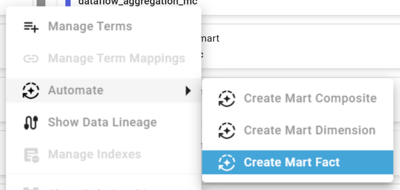
- With the wizard: open the menu of the source model object, choose Automate and then Create Mart Fact. The wizard creates the relationships with their roles and maps the foreign key terms and the selected terms. See Create a Model Object with the wizard. The wizard is not offered on a Mart Hierarchy Flatten or Hierarchy Flatten.
- Manually: create a model object of type Mart Fact in the Datamart column, create a dataflow set, add the source model objects, add a relationship to each Mart Dimension and map the terms, including the foreign key terms.
Business keys are optional on a Mart Fact, and the table has no primary key. Deduplication Method Partition uses the business keys to keep one row per key.
Dimension lookup
The lookup view joins the result view of each referenced Mart Dimension on the foreign key terms:
- With
BG_EffectiveTimestampmapped, a row gets the version of a historized Mart Dimension whoseBG_ValidFromTimestampis at or before the effective timestamp and whoseBG_ValidToTimestampis after it. The lookup reads both from the result view, so it works with the project property Persist Validity on or off. - Without a mapping of
BG_EffectiveTimestamp, the lookup uses the current time and assigns the current version of a historized Mart Dimension. Validation reports the warningRelations will be resolved to the latest version in related model object. - A row without a matching dimension version gets the surrogate key -1, the unknown-member row of the Mart Dimension. This applies to an unknown business key, an empty foreign key and an effective timestamp before the first version. Custom Singleton Values sets the values of that row.
Properties
- Fact Load Strategy, per dataflow:
Truncate Insert(default) empties the table and inserts all source rows.Insertappends rows and keeps the existing ones. WithInsertand no mapping ofBG_IncrementalFilter, every load inserts all source rows again, and validation reports a warning. With a mapping,Insertappends only the increment; see Configure an incremental load. With both values selected on one dataflow, the generator creates both loaders and validation reports a warning.
With Fact Load Strategy Truncate Insert on more than one dataflow, each dataflow's loader empties the table, so the table keeps only the rows of the dataflow loaded last. Use Insert when several dataflows load the same Mart Fact.
- Increment Management Type:
Auto(default) orUser, see Configure an incremental load. - Implementation Type:
FactLoadStrategyonly; the Fact Load Strategy decides the loader. - Foreign Key Mode: foreign key constraints from the surrogate key columns to the Mart Dimension tables; default
Create Disabled. - Deduplication Method (
None,Distinct,Partition) and Sort Order within Partition, per dataflow.
Default Terms
<Mart Dimension>_<role>_SK(BG_MartFact_ForeignKey_Identity): one per relationship, the surrogate key the lookup finds. The table stores it instead of the foreign key terms.BG_EffectiveTimestamp: the point in time that selects the dimension version; map it to the event time of the source. The table does not store it.BG_LoadTimestamp: the load that inserted the row.BG_SourceSystem: empty unless you map it.BG_IncrementalFilter,BG_ID,BG_DataflowName,BG_DataflowSetName,BG_LowerThreshold,BG_UpperThresholdandBG_IncrementLoadStatus: terms of the increment table, used only for an incremental load.
Generated objects
These are the names on Microsoft SQL Server for a Mart Fact sales with one dataflow. The notes below the table name the objects that exist only under a condition.
| Role | Generated name | Purpose |
|---|---|---|
| Source | DM_MF_sales_Source | Joins and maps the sources |
| Deduplication | DM_MF_sales_Deduplication | Removes duplicate rows |
| IncrementSource | DM_MF_sales_IncrementSource | Finds the new increment |
| Increment | DM_MF_sales_Increment | Stores the increments |
| Lookup | DM_MF_sales_Lkp | Finds the surrogate keys |
| Loader | DM_MF_sales_TruncateInsertLoader | Loads the table |
| Storage | DM_MF_sales | Fact table |
| Result | DM_MF_sales_Result | Query view |
- The loaders are stored procedures, the fact table and the increment table are tables, and all other objects are views.
- Each selected Fact Load Strategy has its loader:
_TruncateInsertLoaderempties the table and then inserts,_InsertLoaderonly inserts. - The increment table and the increment source view exist only with a mapped
BG_IncrementalFilter. - The deduplication view exists only with a Deduplication Method other than
None. - With more than one dataflow, the source, deduplication, increment source and lookup views and the loader exist once per dataflow, with the dataflow name after the model object name, for example
DM_MF_sales_Dataflow1_Source.
With the default settings, the dependencies are:
sources -> DM_MF_sales_Source -> DM_MF_sales_Lkp
Mart Dimension result views -> DM_MF_sales_Lkp
DM_MF_sales_Lkp -> _TruncateInsertLoader -> DM_MF_sales -> _Result
Example
The Mart Fact sales on Microsoft SQL Server reads the Business Current View SALESTRANSACTION. It references the Mart Dimension employee with the role cashier, so its surrogate key term is employee_cashier_SK. The foreign key term FK_employee_cashier_EMPLOYEE_ID is mapped to CASHIER_ID, and BG_EffectiveTimestamp to TRANSACTION_TIME. The Fact Load Strategy is Truncate Insert.
The Mart Dimension holds two versions of employee 1: surrogate key 1 from 2026-01-01 to 2026-03-01 and surrogate key 2 from 2026-03-01. The source delivers these transactions:
TRANSACTION_ID  CASHIER_ID  TRANSACTION_TIME  QUANTITY
101             1           2025-12-31 12:00  1.000
102             1           2026-01-01 00:00  2.000
103             1           2026-02-28 12:00  3.000
104             1           2026-03-01 00:00  4.000
105             99          2026-03-15 12:00  5.000
106             NULL        2026-03-16 12:00  6.000
Check the result
After the load on 2026-10-28 at 10:00, query the result view, here in the schema mart:
SELECT TRANSACTION_ID, employee_cashier_SK, QUANTITY,
       BG_LoadTimestamp
FROM mart.DM_MF_sales_Result
ORDER BY TRANSACTION_ID;
This is the result, with a shortened column name and timestamp:
TRANSACTION_ID  SK  QUANTITY  LoadTs
101             -1  1.000     2026-10-28 10:00
102             1   2.000     2026-10-28 10:00
103             1   3.000     2026-10-28 10:00
104             2   4.000     2026-10-28 10:00
105             -1  5.000     2026-10-28 10:00
106             -1  6.000     2026-10-28 10:00
- Transaction 102 happened exactly at the start of version 1 and gets surrogate key 1. Transaction 104 happened exactly at the start of version 2 and gets surrogate key 2.
- Transaction 101 happened before the first version, so it references the unknown-member row -1.
- Cashier 99 does not exist and transaction 106 has no cashier, so both reference -1 as well.
- A repeated load empties the table and inserts the six rows again with the new load timestamp.
Platform differences
- Foreign Key Mode: Microsoft SQL Server and Oracle offer
None,Create DisabledandCreate Enforced. Snowflake, Databricks, Databricks dbt and Fabric Warehouse offerNoneandCreate Disabled. Fabric Lakehouse offersNoneonly. - Snowflake: names are in capitals. The load control task
LC_DM_MF_<MODEL OBJECT NAME>_TRUNCATEINSERTTASKorLC_DM_MF_<MODEL OBJECT NAME>_INSERTTASKcalls the loader. The dataflow properties Use Stream and Warehouse Placeholder Variable Name apply. - Databricks and Fabric Lakehouse: the loader is the notebook
DM_MF_<model object name>_TruncateInsertLoaderorDM_MF_<model object name>_InsertLoader. The properties File Format, Optimization Method, Optimization Method Columns and Use Sequential Dataflow Execution apply. - Databricks dbt: the generator creates
dm_mf_<model object name>_source(view, including the deduplication),dm_mf_<model object name>(table with the lookup) anddm_mf_<model object name>_result(view, only with Create Result Views on). The table model uses the materializationbg_overwriteforTruncate Insertandbg_appendforInsert. With more than one dataflow, each dataflow gets its own loader model. There is no increment table and no Increment Management Type. The properties File Format, Optimization Method and Optimization Method Columns apply. - Oracle: the properties Create Table Statistics, Parallel Degree of Statistics Calculation, Table Compression, Tablespace Table, Tablespace Index and Partition Clause apply.
Limitations
- A Mart Fact has at least one relationship to a Mart Dimension, and every foreign key term must be mapped.
- An aggregation must be defined in all dataflow sets or in none.
- Only
Truncate InsertandInsertare supported as Fact Load Strategy.
Release differences
- Generator 2.0: Foreign Key Mode is available.
- Generator 2.2: Increment Management Type and the terms
BG_LowerThreshold,BG_UpperThresholdandBG_IncrementLoadStatusare available. Databricks dbt is available. - Generator 2.4: Non-Historized Satellite and Non-Historized Business Satellite can be sources.
Related articles
- Previous: Mart Dimension
- Next: Configure an incremental load, Generate artifacts
- Reference: Fact Load Strategy (Dataflow), Implementation Type (Model Object), Foreign Key Mode (Model Object), Deduplication Method (Dataflow), Sort Order within Partition (Dataflow), Custom Singleton Values (Model Object), BG_MartFact_ForeignKey_Identity, BG_EffectiveTimestamp, BG_IncrementalFilter, BG_LoadTimestamp
- See also: Create a Model Object with the wizard, Mart Composite, Mart Out, Model a Data Mart Solution, Effective Timestamp mapped (Business Rule), Fact Load Strategy Insert needs Incremental selected (Business Rule)