
Applies to
Platform: Microsoft SQL Server · Snowflake · Snowflake dbt · Databricks · Databricks dbt · Fabric Lakehouse · Fabric Warehouse · Oracle
This business rule checks the number of terms of a model object against the number its type allows. It raises an error, which blocks generation in the client until you fix it. The rule ID is ID-10005.
Message
The client shows an error with this text on the model object. <model object name> and <type> stand for its name and type, <amount> for the allowed number and the terms that do not count, for example above or equal to 1 (excluding default terms).
Model object '<model object name>' of type '<type>' has the wrong amount
of terms defined. The amount of terms should be <amount>.
On the model object card, point to the error icon to see this message with the rule ID: Error ID-10005. The Generate Artifacts page lists the message without the ID.
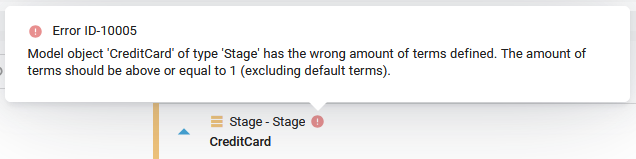
Cause
The model object has more or fewer terms than its type allows:
- At least 1 term besides the Default Terms: Stage, Store Entity, Store Composite, Core Composite, Mart Composite, Mart Out, Mart Hierarchy Flatten, Reference Table, RawVault Composite, Vault Out, Hierarchy Flatten, Current View and History View.
- No terms besides the Default Terms and business key terms: the Hub and Link types and PIT.
- No terms besides the Default Terms, business key terms and foreign key terms: the Record Tracking and Effectivity satellites.
The Business Vault variants follow their Data Vault types.
Fix
Add a term, see Add a Term, or delete the terms that the type does not allow, see Delete a Term. The error disappears when the number matches the details.
Check the result
The error icon is gone from the model object, and generation is no longer blocked by it.
Example
In a Data Mart project on Microsoft SQL Server, all terms except the Default Terms are deleted from the Mart Composite dataflow_aggregation_mc. The client shows:
Model object 'dataflow_aggregation_mc' of type 'Mart Composite' has the
wrong amount of terms defined. The amount of terms should be above or
equal to 1 (excluding default terms).