
Applies to
Platform: Microsoft SQL Server · Snowflake · Databricks · Fabric Lakehouse · Fabric Warehouse · Oracle
Architecture: Data Store · Data Vault · Dimensional · Data Mart
This business rule checks that the Load Caching of a model object is one that the model object type supports. It raises an error, which blocks generation in the client until you fix it. The rule ID is ID-10022.
Message
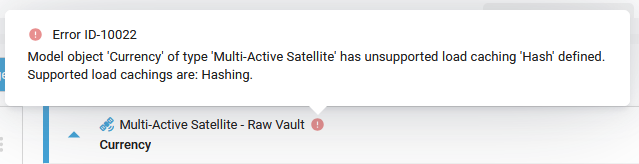
The client shows an error with this text on the model object. <model object name> and <type> stand for its name and type, <value> for its Load Caching and <supported values> for the values the type supports.
Model object '<model object name>' of type '<type>' has unsupported load
caching '<value>' defined. Supported load cachings are:
<supported values>.
On the model object card, point to the error icon to see this message with the rule ID: Error ID-10022. The Generate Artifacts page lists the message without the ID.
Cause
Load Caching of the model object has a value that its type does not support. The rule checks Mart Dimension, Store Entity, Entity, Reference Table and the Hub, Link and satellite types. It accepts only Hashing, or an empty Load Caching. Snowflake dbt and Databricks dbt do not offer Load Caching, so the rule raises no error there.
Fix
- Open Edit Model Object.
- Set Load Caching to
Hashing, or clear it, and save. The error disappears.
Check the result
The error icon is gone from the model object, and generation is no longer blocked by it.
Example
In a Data Mart project on Microsoft SQL Server, the Mart Dimension scd_1_load_caching_hashing has Load Caching Delta, a value the client does not offer for a Mart Dimension. The client shows:
Model object 'scd_1_load_caching_hashing' of type 'Mart Dimension' has
unsupported load caching 'Delta' defined. Supported load cachings are:
Hashing.