
Applies to
Platform: Oracle
Deploy the changes of an Oracle DEV solution to a PROD solution that holds data, with Liquibase Community in Docker. Liquibase writes the differences of the tables and columns as SQL files that you review and run in PROD, and deploy.ps1 of the new version replaces the views and loaders without dropping tables. Afterwards PROD has the structure of DEV and keeps its data and its load history.
biGENIUS-X itself always deploys the complete solution, see Delta deployment.
Prerequisites
- DEV and PROD are deployed from the same project. Each layer has its own user in DEV and in PROD, see Oracle - Placeholder values.
- DEV holds the new version, deployed and loaded without errors. PROD holds the previous version.
- The artifacts of the new version for PROD: generated with the settings of Redeploy and keep data, so without drop statements and without the load control tables, and replaced with the PROD values.
- Docker Desktop, PowerShell 7 and SQL*Plus.
- Oracle Data Pump for the backup, and a directory object on which the PROD layer users have
READandWRITE.
The steps run once per layer: the PROD layer user is the target, the DEV layer user the reference.
Prepare Liquibase
- Create a folder with the subfolders
conf,changelogandlib, and open PowerShell 7 in it.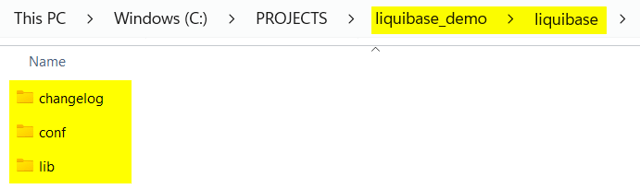
- Pull the image:
docker pull liquibase/liquibase:5.0.4. - Download the JDBC driver ojdbc11-23.26.1.0.0.jar from Maven Central into
lib. The image contains no Oracle driver; Liquibase loads every JAR file inlib. - Create one file
conf\<layer>.propertiesper layer, for exampleconf\STG.propertiesfor the Stage layer. The targeturlis PROD, the reference is DEV:url=jdbc:oracle:thin:@//<PROD host>:<port>/<PROD service> username=<PROD layer user> password=<PROD password> referenceUrl=jdbc:oracle:thin:@//<DEV host>:<port>/<DEV service> referenceUsername=<DEV layer user> referencePassword=<DEV password>
Here<PROD host>,<port>and<PROD service>are the host name, port and service name of PROD, the<DEV …>values those of DEV, and the users and passwords those of the layer. From the container, a database on the same machine ishost.docker.internal.
Each layer uses two commands. diffChangeLog compares the tables and columns of the DEV user with those of the PROD user, writes changelog\<layer>_tables.xml and ends with Liquibase command 'diffChangelog' was executed successfully.:
docker run --rm `
  -v "$PWD\conf:/liquibase/conf" `
  -v "$PWD\changelog:/liquibase/changelog" `
  -v "$PWD\lib:/liquibase/lib" `
  liquibase/liquibase:5.0.4 `
  --defaultsFile=/liquibase/conf/<layer>.properties `
  --changeLogFile=/liquibase/changelog/<layer>_tables.xml `
  --log-level=warning --diffTypes=tables,columns diffChangeLog
updateSQL writes the SQL for PROD into changelog\<layer>_tables.sql:
docker run --rm `
  -v "$PWD\conf:/liquibase/conf" `
  -v "$PWD\changelog:/liquibase/changelog" `
  -v "$PWD\lib:/liquibase/lib" `
  liquibase/liquibase:5.0.4 `
  --defaultsFile=/liquibase/conf/<layer>.properties `
  --changeLogFile=<layer>_tables.xml `
  updateSQL > changelog\<layer>_tables.sql
Deploy the changes
Back up PROD
- Export each PROD layer user with Data Pump:
expdp <PROD layer user>@//<PROD host>:<port>/<PROD service> SCHEMAS=<PROD layer user> DIRECTORY=<directory> DUMPFILE=<dump file>. The export ends withsuccessfully completed. - Check each dump with
impdp <PROD layer user>@//<PROD host>:<port>/<PROD service> DIRECTORY=<directory> DUMPFILE=<dump file> SQLFILE=<SQL file>. Data Pump then writes the DDL of the dump into<SQL file>without importing it.
Prepare renamed and deleted objects
- For each term that the new version renames, rename the column in PROD as the layer user, for example
ALTER TABLE <table name> RENAME COLUMN <old name> TO <new name>;. Otherwise Liquibase writes an added and a dropped column, and the values of the old column are lost. - For each model object that the new version deletes, remove its load objects from the execution plan as the load-control user:
BEGIN PR_Build_Execution_Plan_Remove_Loadobjects( v_Execution_Plan => 'DEV_<project>', v_Load_Config => '<project>', v_Model_Object => '<model object name>'); END; /Here<project>is the project name, for exampletest.datavault.oracle,DEV_<project>is the plan thatexecute.ps1runs, and<model object name>is the name of the deleted model object. Do this before you rundeploy.ps1. The deployment deactivates the load objects of deleted model objects, the procedure removes only active ones, and the loader would stay in the plan and fail at every load.
Columns
- For each layer, run
diffChangeLog. When it finds no difference, it writes no file; continue with the next layer. - Run
updateSQL. On its first run in a PROD user, the file starts with-- Create Database Lock Tableand creates the Liquibase tablesDATABASECHANGELOGLOCKandDATABASECHANGELOG. - Review each statement.
Keep
Liquibase compares structures only. It writes a renamed column as a dropped and an added column, and it drops tables and columns that exist only in PROD; their data is lost. Review the generated SQL files and back up the PROD database before you run them.
DROP TABLEonly for model objects you deleted. A new term that is not nullable is written asADD <column> <data type> NOT NULL, which Oracle rejects on a table with rows; removeNOT NULL. The column is then nullable in PROD. - Run the file as the PROD layer user:
sqlplus <PROD layer user>@//<PROD host>:<port>/<PROD service> @changelog\<layer>_tables.sql. Enter the password, check that no message starts withORA-, and typeEXIT, which commits the changes.
Replace views and loaders
- Open PowerShell 7 in the PROD artifacts of the new version.
- Run
.\deploy.ps1. It creates the tables and indexes that do not exist yet, replaces the views and loaders, and registers new load objects. It keeps the rows of the existing tables, the execution plans and the execution history. - For each deleted model object, list its remaining views and loader package as the layer user with
SELECT object_name, object_type FROM user_objects WHERE object_name LIKE '<table name>%';and drop them, for exampleDROP PACKAGE <table name>_LOADER;andDROP VIEW <table name>_SOURCE;.deploy.ps1does not remove them.
Check the result
deploy.ps1 shows NUMBER_OF_FAILED_STATEMENTS 0 and Invalid objects: with no rows selected for every layer. Then load PROD with .\execute.ps1, see Oracle - Load data - Native load control. NUMBER_OF_FAILED_OR_DISABLED_LOADERS is 0 when every loader succeeded, and the load control table EXECUTION still lists the earlier executions.
Example
The Data Vault project test.datavault.oracle widens the term CUSTOMER_TYPE of the Stage CUSTOMER from VARCHAR2(100) to VARCHAR2(200). For the Stage layer, changelog\STG_tables.xml contains one change:
<modifyDataType columnName="CUSTOMER_TYPE"
  newDataType="varchar(200 BYTE)" tableName="STG_ST_CUSTOMER"/>
For the Raw Vault and the Business Vault, diffChangeLog wrote no file. After the Liquibase tables, STG_tables.sql contains this statement, where <PROD Stage user> is the Stage user of PROD:
ALTER TABLE <PROD Stage user>.STG_ST_CUSTOMER
  MODIFY CUSTOMER_TYPE VARCHAR2(200 BYTE);
Afterwards CUSTOMER_TYPE in PROD had the length 200 and stayed NOT NULL. deploy.ps1 reported 0 failed statements per layer and ran only the configuration scripts of the load control; the next load reported 0 failed loaders. The satellite RDV_SAT_COMMON_CUSTOMER kept its 4 rows, and EXECUTION listed 2 executions.
A later version maps the Stage terms CUSTOMER_ID and BU into the satellite common_customer, renames its term REMARKS to CUSTOMER_REMARKS and deletes the satellite first_value_second_null. After the column was renamed by hand, only RV_tables.xml was written, and the reviewed RV_tables.sql contains, with <PROD Raw Vault user> for the Raw Vault user of PROD:
ALTER TABLE <PROD Raw Vault user>.RDV_SAT_COMMON_CUSTOMER
  ADD CUSTOMER_ID NUMBER;
ALTER TABLE <PROD Raw Vault user>.RDV_SAT_COMMON_CUSTOMER
  ADD BU VARCHAR2(2 BYTE);
DROP TABLE <PROD Raw Vault user>.RDV_SAT_FIRST_VALUE_SECOND_NULL;
Liquibase wrote both ADD statements with NOT NULL; the review removed it. After deploy.ps1, four views and the loader package of RDV_SAT_FIRST_VALUE_SECOND_NULL remained and were dropped. The next load reported 0 failed loaders and wrote a new version for each of the 3 customers, with values in the new columns; the earlier versions keep NULL there. CUSTOMER_REMARKS kept the values of REMARKS, and EXECUTION listed all earlier executions.
Failure symptoms and recovery
Liquibase does not find the Oracle driver
Message: Cannot find database driver: oracle.jdbc.OracleDriver
Cause: lib holds no Oracle JDBC driver or is not mounted.
Fix: Download the driver into lib and mount it with -v "$PWD\lib:/liquibase/lib".
Liquibase warns about duplicate JAR files
Message: WARNING: *** Duplicate ojdbc11 JAR files ***
Cause: The properties file also sets classpath to the driver in lib, which Liquibase loads already.
Fix: Remove the classpath line.
Adding a column fails on a table with rows
Message: ORA-01758: table must be empty to add mandatory (NOT NULL) column
Cause: The file adds a NOT NULL column to a table with rows. SQL*Plus continues with the next statements, and the file still records the change as executed in DATABASECHANGELOG.
Fix: Restore the layer user from the export with impdp <PROD layer user>@//<PROD host>:<port>/<PROD service> DIRECTORY=<directory> DUMPFILE=<dump file> TABLE_EXISTS_ACTION=REPLACE. Then run diffChangeLog and updateSQL again, remove NOT NULL and run the new file.
updateSQL does not find the changelog
Message: The file RV_tables.xml was not found in the configured search path
Cause: diffChangeLog found no difference in this layer and wrote no file.
Fix: None needed. Continue with the next layer.
For failures of deploy.ps1, see Oracle - Deployment.
Related articles
- Previous: Oracle - Deployment
- Next: Oracle - Load data - Native load control, Oracle - Load data - Apache Airflow load control
- Reference: Oracle - Placeholder values, Deployment Options (Project), Deploy LoadControl (Project), Configure LoadControl (Project)
- See also: Delta deployment, Oracle - Artifacts, Deploy a Project in production