
Applies to
Platform: Databricks · Databricks dbt · Fabric Lakehouse
Optimization Method Columns (OptimizationMethodColumns) holds the terms whose columns the platform uses to partition or cluster a generated table. It works together with Optimization Method.
The property is not available on Microsoft SQL Server, Snowflake, Snowflake dbt, Fabric Warehouse and Oracle.
Where to set it
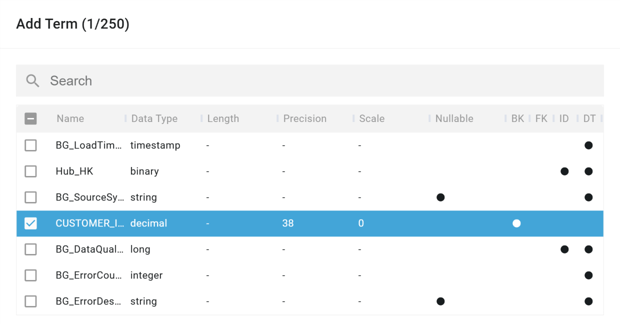
Set Optimization Method Columns when you edit a model object that has Optimization Method. The property is a term selector: you select one or more terms of the model object from its term list.
Values
- One or more terms of the model object: used when Optimization Method is
Partitioned ByorCluster By. - With Optimization Method
None, the selected terms are ignored. - Empty while a method is set: validation reports the error
Model object has an optimization method, but no optimization method columns defined.The client does not generate the project until a column is selected.
Default value
Empty, no term selected.
Effect on generated tables
- Databricks and Fabric Lakehouse: the columns of the selected terms appear in
PARTITIONED BY (...)orCLUSTER BY (...)of the table. - Databricks dbt: the term names appear in
partition_by=[...]orliquid_clustered_by=[...]of the model configuration.
Example
The Hub load_customer_hub has Optimization Method Partitioned By and the business key term CUSTOMER_ID in Optimization Method Columns. On Databricks the deployment notebook creates the Hub table with:
USING delta
PARTITIONED BY (
     `customer_id`
)
In a Databricks dbt project the Hub model gets:
file_format='delta',
partition_by=['CUSTOMER_ID'],
A Satellite with Optimization Method Cluster By and the term DESCRIPTION gets CLUSTER BY (`description`) on Databricks and liquid_clustered_by=['DESCRIPTION'] in dbt.
Related articles
- Reference: Optimization Method (Model Object), File Format (Model Object)
- See also: Optimize load performance