
Applies to
Platform: Microsoft SQL Server · Snowflake · Databricks · Databricks dbt · Fabric Lakehouse · Fabric Warehouse · Oracle
Architecture: Dimensional · Data Mart
This business rule warns when a dataflow of a Fact or Mart Fact has both Fact Load Strategy values selected. It raises a warning, and generation continues. The rule ID is ID-10027.
Message
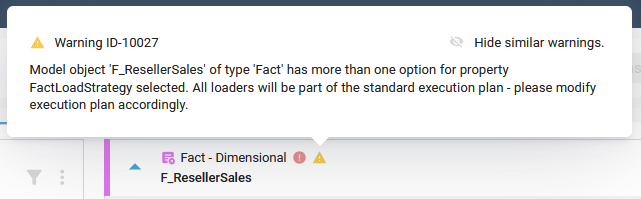
The client shows a warning with this text on the model object. <model object name> and <type> stand for its name and type.
Model object '<model object name>' of type '<type>' has both options
'Truncate Insert' and 'Insert' selected for property Fact Load
Strategy. Both loaders are generated and added to the default execution
plan. Run the InsertLoader and the TruncateInsertLoader in separate
execution plans; they must not be in the same execution plan.
On Databricks dbt, the message is:
Model object '<model object name>' of type 'Mart Fact' has both options
'Truncate Insert' and 'Insert' selected for property Fact Load
Strategy. In dbt, only 'Truncate Insert' is applied and 'Insert' is
ignored. Select one value.
On the model object card, point to the warning icon to see this message with the rule ID: Warning ID-10027. The Generate Artifacts page lists the message without the ID.
Cause
Fact Load Strategy of a dataflow has both Insert and Truncate Insert selected. The generator then creates both loaders and adds both to the default execution plan. On Databricks dbt, only Truncate Insert runs: the table model uses the materialization bg_overwrite, and there are no execution plans.
Fix
Do one of the following:
- Keep one Fact Load Strategy on the dataflow, see Edit a Dataflow. The warning disappears.
- Keep both, and run the two loaders in separate execution plans, see Plan Load Control. They must not be in the same execution plan. The warning stays, and generation continues. This option does not apply to Databricks dbt; keep one value there.
Check the result
With one Fact Load Strategy per dataflow, the warning icon is gone from the model object.
Example
In a Data Mart project on Microsoft SQL Server, the dataflow of the Mart Fact cust_index_without_default_indexes gets Fact Load Strategy Insert and Truncate Insert. The client shows:
Model object 'cust_index_without_default_indexes' of type 'Mart Fact'
has both options 'Truncate Insert' and 'Insert' selected for property
Fact Load Strategy. Both loaders are generated and added to the default
execution plan. Run the InsertLoader and the TruncateInsertLoader in
separate execution plans; they must not be in the same execution plan.