
Applies to
Platform: Microsoft SQL Server · Snowflake · Databricks · Fabric Lakehouse · Fabric Warehouse · Oracle
Architecture: Data Store
This business rule checks that a Store Entity does not combine delete detection with a multi-version load. It raises an error, which blocks generation in the client until you fix it. The rule ID is ID-10040.
Message
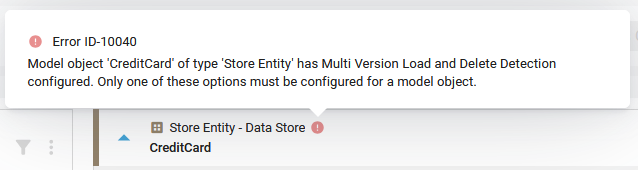
The client shows an error with this text on the model object. <model object name> and <type> stand for its name and type.
Model object '<model object name>' of type '<type>' has Multi Version
Load and Delete Detection configured. Only one of these options must be
configured for a model object.
On the model object card, point to the error icon to see this message with the rule ID: Error ID-10040. The Generate Artifacts page lists the message without the ID.
Cause
Delete Detection Method of the Store Entity is not None, and a source model object in one of its dataflow sets has Version Valid From Term (ValidFromSourceTerm) set, which switches on the multi-version load.
Fix
Do one of the following:
- Set Delete Detection Method of the Store Entity to
Nonein Edit Model Object. - Clear Version Valid From Term of the source model object, see Edit a Dataflow Model Object, if the Store Entity needs no multi-version load.
Check the result
The error icon is gone from the Store Entity, and generation is no longer blocked by it.
Example
In a Data Store project on Microsoft SQL Server, the Store Entity mvl_historized_source_first has a multi-version load and gets Delete Detection Method FullSet. The client shows:
Model object 'mvl_historized_source_first' of type 'Store Entity' has
Multi Version Load and Delete Detection configured. Only one of these
options must be configured for a model object.