
Please consult the article Replace the placeholders in the Artifacts to learn how to replace the placeholders with the values explained below.
Placeholder values
Depending on the Generator Configuration you are using for a Fabric Warehouse Target Technology, you can replace the placeholder values with the following:
database_name
target solution
Each database_name is filled by default with warehouse.
It should contain the database name of the target warehouse.
Example: docu_bgwarehouse.
source system
If you are using a Linked Project, it should contain the database name of the source lakehouse or warehouse containing the source table created before with the Linked Project.
schema_name
target solution
Each schema_name for the target solution must contain the target schema name you want to have in the target warehouse.
source system
If the source of the Project is a warehouse, it must contain the source schema name in the warehouse.
If the source of the Project is a lakehouse:
- If the schemas are enabled in the lakehouse, fill in the schema name
- If not, fill in dbo
key_vault_name
Fill in the Key Vault name you created during the Fabric Warehouse - Target environment creation.
key_vault_tenant_id_secret_name
Fill in the secret name you created in the Key Vault.
It is tenant-id in our example.
key_vault_client_id_secret_name
Fill in the secret name you created in the Key Vault.
It is client-id in our example.
key_vault_client_secret_secret_name
Fill in the secret name you created in the Key Vault.
It is client-secret in our example.
warehouse_server_address
You can find it in Fabric :
- Open your Workspace
- Choose the Settings option in the Warehouse context menu:
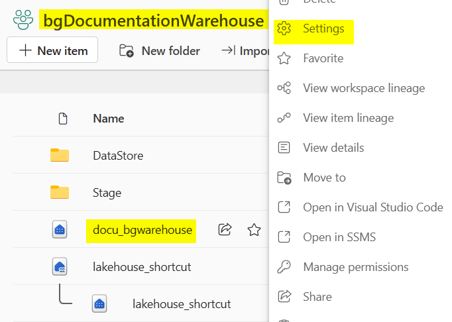
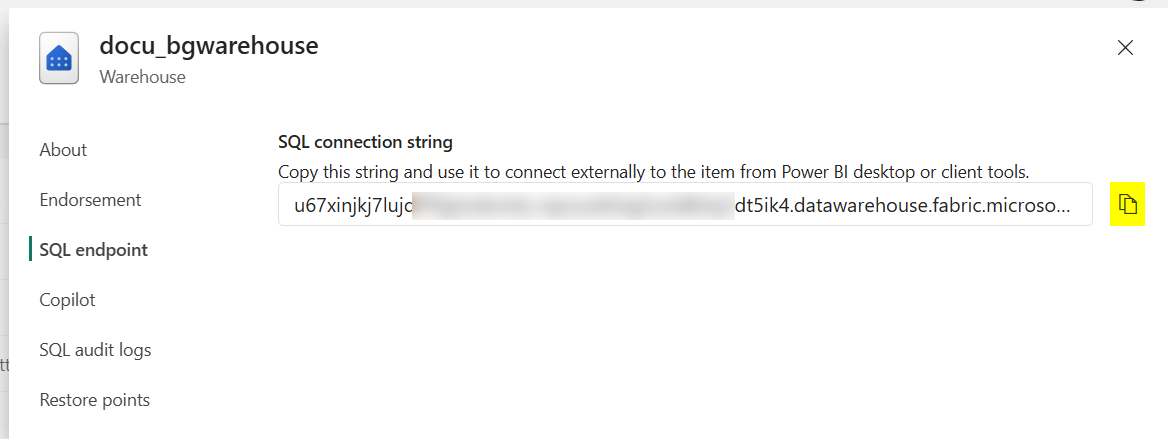
- Open the SQL endpoint tab
- Copy the SQL connection string value:
execution_log_table_name
For logging, you can choose the table name that will contain the logs.
It is execution_log by default.
deployment_log_table_name
For logging, you can choose the table name that will contain the logs.
It is deployment_log by default.
application_name
For logging, you can fill in application_name to easily identify the logs concerning your Project in Databricks.
application_environment_name
For logging, you can fill application_environment_name to easily identify the logs concerning your Project in Databricks, depending on the target environment (development, integration, production...).
It is DEV by default.
You can download a replacement_config.json example here for:
- Fabric Warehouse Stage
- Fabric Warehouse Data Store
- Fabric Warehouse DataVault and Mart
- This example is similar for Fabric Warehouse DataVault and Datamart