
Applies to
Platform: Microsoft SQL Server · Snowflake · Databricks · Fabric Lakehouse · Fabric Warehouse · Oracle
Architecture: Data Store
This business rule warns when a Store Entity with delete detection has no term with Historization Type SCD1 or SCD2. It raises a warning, and generation continues. The rule ID is ID-10046.
Message
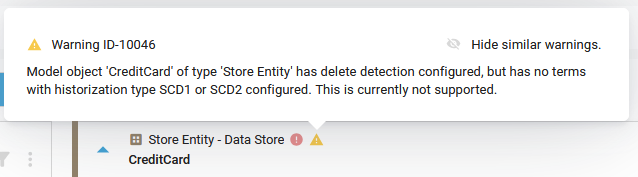
The client shows a warning with this text on the Store Entity. <model object name> and <type> stand for its name and type.
Model object '<model object name>' of type '<type>' has delete detection
configured, but has no terms with historization type SCD1 or SCD2
configured. This is currently not supported.
On the model object card, point to the warning icon to see this message with the rule ID: Warning ID-10046. The Generate Artifacts page lists the message without the ID.
Cause
Delete Detection Method of the Store Entity is not None. Its terms have Historization Type SCD0, and none has SCD1 or SCD2. Business key terms and Default Terms do not count.
Fix
Do one of the following:
- Set Historization Type SCD1 or SCD2 on at least one term that is not a business key, see Edit a Term.
- Set Delete Detection Method of the Store Entity to
Nonein Edit Model Object.
Check the result
The warning icon is gone from the Store Entity.
Example
In a Data Store project on Microsoft SQL Server, the Store Entity scd_0 gets Delete Detection Method FullSet. Apart from the business key term CUSTOMER_ID, all its terms have SCD0. The client shows:
Model object 'scd_0' of type 'Store Entity' has delete detection
configured, but has no terms with historization type SCD1 or SCD2
configured. This is currently not supported.