
Applies to
Platform: Microsoft SQL Server · Snowflake · Snowflake dbt · Databricks · Databricks dbt · Fabric Lakehouse · Fabric Warehouse · Oracle
Architecture: Data Store · Data Vault · Data Mart
You may have a historized ODS with delete detection enabled, or a source containing multiple entries for the same Business Key but with different timelines. In these cases, you can load the full history of your source object into your target model object using the Multi-Version Load behavior.
The Multi-Version Load behavior can be configured for the following Model Objects:
- Store Entity
- Satellite
- Link Satellite
- Business Satellite
- Business Link Satellite
- Mart Dimension
As it is possible to mix SCD1 and SCD2 in a Store Entity, please check if the timelines of the historized source Model Object are correct. If not, this can lead to unexpected results.
Configuration
To configure the Multi-Version Load:
-
For all Dataflow Set Model Objects containing historized data, set the Version Valid From Term Property to the Dataflow Set Model Object Term that contains the start date of the source row.
-
For Data Vault Model Objects, ensure that the corresponding Hub and all related Links are deduplicated by setting the Deduplication Method Property.
Recommendation:
Enable Multi-Version Loading for as few source Model Objects as possible. Set the Version Valid From Term Property only on those source objects that contain their own historical data.
For example:
-
Table 1: Cost centers with business-provided effective dates.
-
Table 2: Cost center descriptions in multiple languages, each with its own effective dates.
If you only care about the English descriptions of cost centers and always want to use the most recent version, you can apply a join filter. This filter links cost centers to cost center descriptions while keeping only the latest English description for each cost center code.
In this case, you should not set the Version Valid From Term Property on the cost center description table, because the description history is irrelevant.
Only if you need to capture the full history of cost center descriptions should you apply the Version Valid From Term Property on that table. In that scenario, do not apply a join filter on the latest description; instead, consider all English descriptions.
Example: Data Vault Modeling
Source data
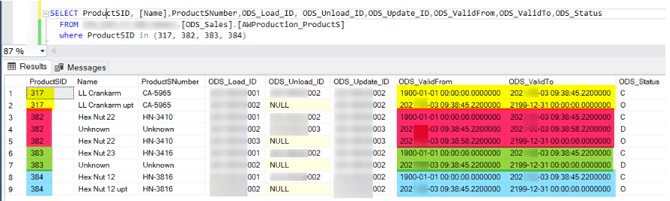
In this example, the historized source table is ProductS.
Products 317, 382, 383, and 384 contain multiple rows for different timelines.
Data Vault model
Let's create the following objects:
- A Hub named HubProductS (source data ODS_Sales.AWProduction_ProductS)
- Set the Deduplication Method Property to Distinct
- A Satellite named SatProductS (source data ODS_Sales.AWProduction_ProductS) and its relationship to the HubProductS
- Set the Version Valid From Term Property to the Term ODS_ValidFrom
Load of data
Generate the code, replace the placeholders, deploy, and load the project.
Then, check the data for the ProductS with the following query:
SELECT sat.[BG_LoadTimestamp]
      , hub.[Hub_HK]
      , hub.[ProductSID]
      , sat.[BG_ValidFromTimestamp]
      , sat.[Name]
      , sat.[ProductSNumber]
  FROM [RDV].[RDV_SAT_AW_ProductS1] sat
  left join [RDV].[RDV_HUB_AW_ProductS] hub on hub.Hub_HK = sat.Hub_HK
  where hub.[ProductSID] in (317, 382, 383, 384)
Expected result:

The history from the source is loaded, and the values of BG_ValidFromTimestamp match the values of the mapped term ODS_ValidFrom.