
Applies to
Platform: Microsoft SQL Server · Snowflake · Databricks · Fabric Lakehouse · Fabric Warehouse · Oracle
Architecture: Data Store
Delete detection marks rows of a Store Entity as deleted when the source no longer delivers them or reports them as deleted. Use it when records disappear from a source and the Data Store must show it. After each load, every deleted business key has a current row with BG_IsDeleted set to 1, and no row is physically removed.
Record Tracking Satellites in Data Vault also have a Delete Detection Method property; this article does not cover them. Delete detection cannot be combined with a multi-version load.
Prerequisites
- A Store Entity with at least one business key term, see Store Entity.
- For
DeletedSet, and forFullSetwith a list of keys to keep: a model object that holds the list, with terms of the same names as the business key terms of the Store Entity.
Choose the method
Choose the method by what the source delivers on every load.
None(default): no delete detection.FullSet: every load delivers all valid rows. A stored key that is missing from the load is marked as deleted. An empty load therefore marks every stored key as deleted.FullSetwith a Delete Detection Source: a separate model object lists all valid business keys, and the load may deliver changed rows only. A stored or delivered key that is not on the list is marked as deleted, also in the load that delivers it.PartialSet: every load delivers all valid rows of a part of the data, for example of some countries. Only stored rows whose partial-term values appear in the load are checked. Available since Generator 2.2.DeletedSet: a separate model object lists the business keys deleted in the source. A listed key is marked as deleted when it is stored or delivered, even when the load delivers it again. Other listed keys are ignored.
Configure delete detection
- In Dataflow Modeling, open the menu of the Store Entity and choose Edit Model Object.
- In the group Delete Detection, set Delete Detection Method to the method you chose.
- For
DeletedSet, or forFullSetwith a list of keys to keep, select the model object with the list in Delete Detection Source. - For
PartialSet, select one or more terms in Delete Detection Partial Terms and leave Delete Detection Source empty. - With several partial terms, set Delete Detection Partial Operator to
And(default) orOr, see Partial terms and operator.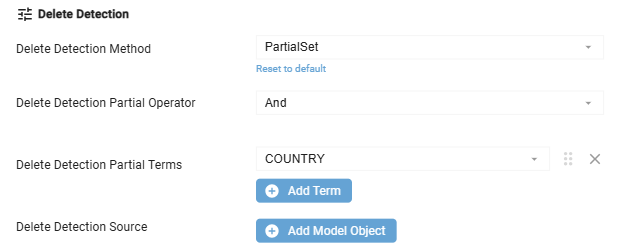
- Save the model object. Validation messages are explained under Failure symptoms and recovery.
- Generate the artifacts, deploy and load as usual.
Partial terms and operator
A stored row is checked when its partial-term values appear in the current load:
And: the value of every partial term appears in the load.Or: the value of at least one partial term appears in the load.- Each term is compared on its own, not as a combination. With the terms
COUNTRYandZIP_CODEandAnd, a stored row with DE and 8000 is checked when the load has any DE row and any 8000 row. - A NULL value never matches, neither stored nor delivered. With
Or, such a row can still match through another term. - An empty load checks no row and marks nothing as deleted.
Choose terms that identify the delivered part, for example the country or the fiscal year.
Generated objects
Delete detection adds three objects, here for a Store Entity customer:
- Loader
DS_SE_customer_DeleteDetectionLoader: rebuilds the table. The load control runs it after the Delete Detection Source and before the Store Entity loader. - Table
DS_SE_customer_DeleteDetectionTable: the keys marked as deleted by the current load. - View
DS_SE_customer_DeleteDetection: the delivered rows plus one deleted row per key in the table, read by the Store Entity loader.
A deleted row has BG_IsDeleted 1, the business key, and unknown values in all other terms, for example Unknown for text and 1900-01-01 for dates. It is stored like any other change:
- SCD2: the deleted row is a new version, valid from the load. The previous version keeps its values.
- SCD1: the deleted row overwrites the stored row, and the last known values are lost.
- A key that stays deleted gets no further row.
- A key that returns gets its values back with
BG_IsDeleted0, as a new version (SCD2) or in the same row (SCD1). WithDeletedSet, this happens only after the key is removed from the list.
The first load into an empty Store Entity marks no key as deleted. Exception: a delivered key that is on the DeletedSet list, or not on the FullSet list, arrives only as a deleted row. On a Store Entity that already holds data, the first load with delete detection marks every key that the method finds at once.
Example
A source delivers customers country by country. The Store Entity customer on Microsoft SQL Server has the business key CUSTOMER_ID and SCD2 terms such as CUSTOMER and COUNTRY. Its Delete Detection Method is PartialSet with the partial term COUNTRY.
- Load 1 delivers customers 1 and 2 from CH and customers 3 and 4 from DE.
- Load 2, on 2026-10-02, delivers only customer 1 from CH.
Load 2 checks the stored CH customers and marks customer 2 as deleted. Customers 3 and 4 keep their rows, because load 2 delivered no DE rows.
Check the result
Query the result view of the Store Entity, here in the schema store:
SELECT CUSTOMER_ID, CUSTOMER, COUNTRY, BG_IsDeleted,
       BG_ValidFromTimestamp, BG_ValidToTimestamp
FROM store.DS_SE_customer_Result
ORDER BY CUSTOMER_ID, BG_ValidFromTimestamp;
This is the result after load 2 of the example, with the timestamp columns shortened to dates. The first version of a key is valid from 1900-01-01:
CUSTOMER_ID  CUSTOMER    COUNTRY  BG_IsDeleted  ValidFrom   ValidTo
1            Customer 1  CH       0             1900-01-01  9999-12-31
2            Customer 2  CH       0             1900-01-01  2026-10-02
2            Unknown     Unknown  1             2026-10-02  9999-12-31
3            Customer 3  DE       0             1900-01-01  9999-12-31
4            Customer 4  DE       0             1900-01-01  9999-12-31
The keys that the latest load marked as deleted are in store.DS_SE_customer_DeleteDetectionTable.
Failure symptoms and recovery
In the messages, <store entity name> stands for the name of the Store Entity.
Validation reports a missing business key term in the source
Message: Model object '<store entity name>' of type 'Store Entity' has a delete detection source configured, but for a business key term the corresponding source term in the referenced model object could not be found.
Cause: the Delete Detection Source has no term with the name of a business key term of the Store Entity.
Fix: add or rename the term in the source model object.
Validation warns about an incremental source
Message: Model object '<store entity name>' of type 'Store Entity' has source objects, which are loaded incrementally and has no delete detection source configured. This might lead to unexpected results.
Cause: a source of the Store Entity is loaded incrementally, so FullSet and PartialSet compare the stored keys with new rows only.
Fix: set a Delete Detection Source that lists all valid keys (FullSet) or the deleted keys (DeletedSet).
Validation warns that no term has SCD1 or SCD2
Message: Model object '<store entity name>' of type 'Store Entity' has delete detection configured, but has no terms with historization type SCD1 or SCD2 configured. This is currently not supported.
Cause: all terms other than the business keys have Historization Type SCD0.
Fix: set Historization Type SCD1 or SCD2 for at least one term.
Many stored keys are marked as deleted after a load
Cause: the method is FullSet, and the load delivered no rows or only part of them, or the list of the Delete Detection Source was empty.
Fix: load the complete set again. Each key that returns gets BG_IsDeleted 0. In SCD2, the deleted versions stay in the history.
Related articles
- Previous: Store Entity
- Next: Generate artifacts
- Reference: Delete Detection Method (Model Object), Delete Detection Source (Model Object), Delete Detection Partial Terms (Model Object), Delete Detection Partial Operator (Model Object), BG_IsDeleted
- See also: Configure a multi-version load, No delete detection with multi-version load (Business Rule), No delete detection source with a deleted set (Business Rule), Delete detection source Business Key exists (Business Rule), No delete detection with an incremental load in the source (Business Rule), Delete detection without historization set in the terms (Business Rule)