
Applies to
Platform: Microsoft SQL Server · Snowflake · Snowflake dbt · Databricks · Databricks dbt · Fabric Lakehouse · Fabric Warehouse · Oracle
Architecture: Data Store · Data Vault · Dimensional · Data Mart
This business rule warns when a business key term of a model object is nullable. It raises a warning, and generation continues. The rule ID is ID-10013.
Message
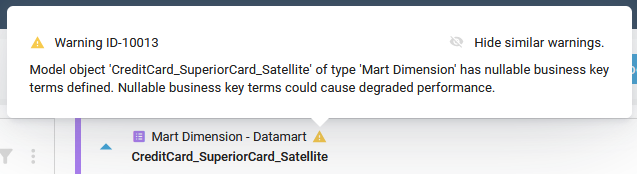
The client shows a warning with this text on the model object. <model object name> and <type> stand for its name and type.
Model object '<model object name>' of type '<type>' has nullable
business key terms defined. Nullable business key terms could cause
degraded performance.
On the model object card, point to the warning icon to see this message with the rule ID: Warning ID-10013. The Generate Artifacts page lists the message without the ID.
Cause
At least one term that is marked as business key is also marked as nullable. The rule checks Store Entity, Reference Table, Entity and Mart Dimension.
Fix
The model object is generated as configured. Decide which case applies:
- The business key terms never hold NULL: open Manage Terms and clear the nullable mark of each business key term. The warning disappears.
- The business key terms can hold NULL: keep them nullable. The warning stays.
Check the result
With no nullable business key term, the warning icon is gone from the model object.
Example
In a Dimensional project on Microsoft SQL Server, the Entity dataflow_multi_en has the nullable business key terms ADDRESS_LINE1, ADDRESS_LINE2 and ADDRESS_LINE3. The client shows:
Model object 'dataflow_multi_en' of type 'Entity' has nullable business
key terms defined. Nullable business key terms could cause degraded
performance.